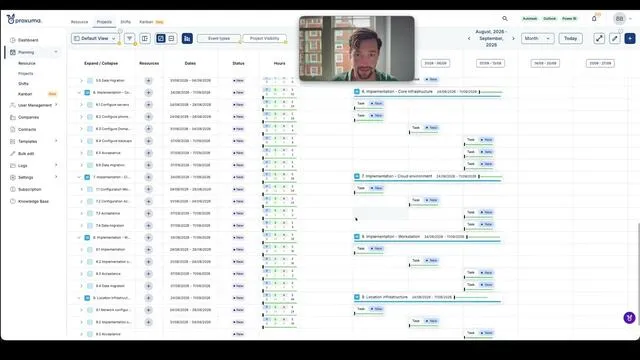
Onboarding

How onboarding works, from signup to planned work.

There is no data migration and nothing to re-enter. Proxuma syncs straight from Autotask, the first sync takes up to 24 hours, and the method is written down before you arrive: 101 guides, 17 filmed walkthroughs and a free session with our team every week. The timeline below is the whole process.

  • AutotaskAutotask stays the system of record
  • No migration, no cut-over
  • Free sessions every week

24h

To live on your own data

Connect Autotask and the first sync brings in your tickets, projects and people. It takes up to 24 hours, depending on how much data your Autotask account holds.

0

Migrations

Autotask stays your PSA and your source of truth. Proxuma sits on top of it. Nothing moves and nothing gets re-entered.

101

Guides written for you

Across nine topic areas, with 17 filmed walkthroughs. Counted in the knowledge base on 14 August 2026.

Weekly

Free sessions

A free session with our team every week for as long as you need it, plus free project templates so your first projects do not start from a blank board.

Step by step

The first 30 days, on one calendar

From where you are today to fully planned work. Most of the hands-on effort sits on day one, inside Autotask; after that the sync does the heavy lifting. Cyan steps are the ones where a person from our team is on the other side, at no cost to you. The dotted line runs on calendar time, and the entry that repeats along it is the free weekly session with Max and Karla.

  1. Today 0 Start

    Where you start

    Nothing to install

    Autotask already holds your tickets, projects and people, and that is all Proxuma needs. There is nothing to install, but there is real configuration: office hours, capacity, planning defaults. We set those up together, live on the kickoff call, with maybe a few tweaks during the trial. Compare that with rolling out Autotask itself: months of implementation before anything goes live, and no trial at all. The short checklist further down this page is everything you prepare on your own.
  2. Day 1 Connect

    Sign up and connect Autotask

    Autotask

    In Autotask

    Create your company account at app.proxuma.com. You add a card at signup; nothing is charged during the 14-day trial. Then, on the Autotask side:
    • Create a dedicated security level, copied from the built-in API User (system) level, with Web Services API access and webhooks enabled.
    • Create an API user on that level and generate its Client ID and Secret, with Proxuma as the integration vendor.
    • Paste the credentials and your Autotask zone into Proxuma. The first sync starts.
    Prefer to grant less than full permission? There is a least-permissions setup. All three guides are open to everyone, no account needed.
  3. Day 1 to 2 Sync

    The first sync completes

    Runs on its own

    Up to 24 hours, depending on how much data your Autotask account holds. Progress shows at the top of your Proxuma screen and you get an email the moment it finishes. From then on the timeline shows your real tickets, projects and people.
  4. Weekly session with Max and Karla

    Week 1 · free, every single week

  5. Week 1 Configure

    Review the settings

    With a person

    With your data in, you tune office hours, workweeks and capacity, event colours, locations, and the planning defaults that decide what your board shows. Proxuma reads timezone and location from Autotask; office hours are company-wide, capacity is set per person. Rather do it together? The weekly session with Max and Karla is open to you from day one.
  6. Weekly session with Max and Karla

    Week 2 · same hour, same people

  7. Weeks 2 to 4 Plan

    Plan real work

    With a person

    Your dispatchers and project managers start planning in Proxuma. You do not start from a blank board: during onboarding we share free project templates for common MSP project types, built around one master template you strip down per project. The weekly sessions are the place to bring whatever you run into.
  8. Weekly session with Max and Karla

    Week 3 · bring what you run into

  9. Weekly session with Max and Karla

    Week 4 · keeps going after day 30

  10. Day 30 Done

    Fully operational

    The finish line

    Planning happens in Proxuma, Autotask stays the system of record, and the two stay in sync without anyone thinking about it. The weekly free sessions do not stop here; they stay open for as long as you have questions.
  11. Day 30+ Optional

    Optional: consulting on Autotask itself

    Paid

    If your Autotask setup itself is what holds you back, Proxuma Consulting is delivered by the consultants at Dxfferent, who built Proxuma: end-to-end implementation support and clickable process maps built into Autotask. Paid, and priced separately from the licence.

The knowledge base

Not just a product manual.

101 articles and 17 tutorial videos, written so you can get from a fresh account to planned work without waiting on anyone. Twelve of them are open at kb.proxuma.com right now, no account needed, so you can judge the writing before you sign up for anything.

01 Set Proxuma up from scratch

The Implementation Guide runs 19 chapters, ordered the way the work actually happens. Follow it from the first login onward and the next step is always written down.

02 Run planning day to day

Every screen in the product has its own walkthrough, and its own troubleshooting guide for the days something looks off. Whatever is in front of you, there is a page that explains it.

03 Connect Autotask and the rest

Setup guides for the Autotask connection and the tools around it, so the sync is configured right on the first pass instead of the third.
Dxfferent

The playbook · free with every trial

The planning advice MSPs pay consultants for. Free from day one.

The rest of the knowledge base explains the product. The playbook goes further: it sets out how to approach planning and how to run projects, the way the consultants at Dxfferent run them in their own MSP engagements. They built Proxuma, and the playbook is their method in writing. It is part of the knowledge base from the first day of your trial, at no extra cost.

Video training

The free Autotask course, and the Proxuma walkthroughs

Proxuma was built by the Autotask consultants at Dxfferent. Before the product existed they recorded the whole of Autotask PSA, module by module, and put it on YouTube for free. It is still up, and it needs no Proxuma account, no trial and no signup of any kind.

Open to everyone on YouTube

The Autotask Bootcamp Course

Ninety videos in one playlist, numbered 1.01 through 10.03, from the first domain setting to the last report. Ten modules, in the order you would actually configure them. Each link below opens that module's first video, inside the playlist:

DxfferentRecorded by the consultants at Dxfferent, world-renowned MSP and Autotask experts, on the playlist "Free Autotask Training". Video count and titles read from the public playlist on 14 August 2026.

17 videos · inside the knowledge base
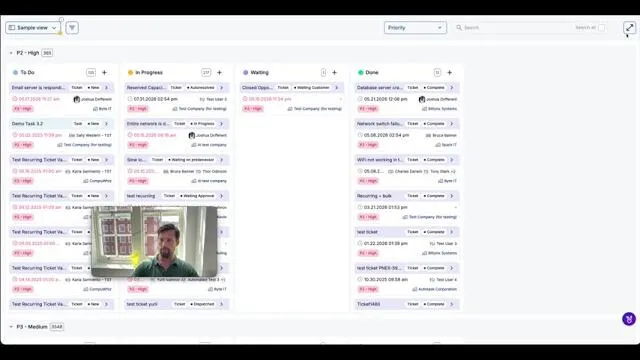
The Proxuma walkthroughs

Seventeen filmed walkthroughs sit inside the knowledge base articles, so the video and the written steps are on the same page. They cover the Project Management Tutorial (7 videos), the Kanban board, capacity and resource assignment, the menu bar, reserved capacity, shifts, filters, bulk edit, resource insights and the client portal.
Still from the Kanban board walkthrough

Included from your trial

Kanban Board Walkthrough video
Still from the capacity and resource assignment walkthrough

Included from your trial

Capacity and Resource Assignment Walkthrough video

DxfferentTutorials filmed by the consultants at Dxfferent. Every walkthrough opens up from day one of your trial, together with the articles they live in.

Support

Help during onboarding

Plenty of customers set Proxuma up on their own and never speak to us until they have a question. If you would rather not do it alone, these are the three routes. Two cost nothing.

Weekly onboarding sessions

Held by our own team, open to you from day one of the trial. Bring a settings question, a planning question, or a workflow you want a second opinion on.
Free. Book it for the day after you register, so the first sync has finished.

A shared Teams channel

From day one you are in a shared Microsoft Teams channel where Karla from support and the product team pick up your questions and bug reports.
Free. Set up during onboarding.
+3

Consulting on Autotask itself

If your Autotask setup is the thing holding you back, Proxuma Consulting works with MSPs on exactly that: end-to-end implementation support and clickable process maps built into Autotask.
Paid, and priced separately from the Proxuma licence.

DxfferentDelivered by the consultants at Dxfferent, who built Proxuma.

Before day one

Have this ready

Five things, and a sixth that is entirely optional. With these in place, day one is smooth.

  • Admin access to Autotask Creating a security level and an API user requires admin rights in Autotask.
  • An available API user licence The new API user takes an Autotask API-only licence. Check you have one free.
  • Your Autotask zone The server your Autotask runs on, for example webservices19 if you use ww19. You will paste it alongside the credentials.
  • A Proxuma owner Decide who on your team administers Proxuma and reviews the settings in the first week.
  • Your key users, identified The planners and project managers who will use Proxuma daily. They validate that the setup matches how you actually work.
  • Optional: a seat in a weekly session Not required for day one, but it is free and the calendar is open. Book a free onboarding session

Questions

Frequently asked

How long does the first sync take?

Up to 24 hours, depending on how much data your Autotask account holds. You can follow the progress at the top of your Proxuma screen, and you receive an email the moment the sync completes.

Do we have to migrate data or stop using Autotask?

No. Autotask stays your PSA and your source of truth. Proxuma syncs from it and keeps syncing, so there is nothing to migrate and no cut-over moment.

What permissions does the API user need?

The fastest route is a security level with full permission on the Web Services API, webhooks enabled. If you prefer to grant less, follow the least-permissions setup, which lists the exact permissions Proxuma needs.

How much of our time does onboarding take?

The hands-on work is creating the security level and API user in Autotask on day one, and reviewing your settings during the first week. The sync itself needs no attention. Most teams spend the rest of the first month simply planning in the tool.

Can we read the documentation before we sign up?

Partly. Twelve of the 101 articles are open to everyone, and they are the ones that matter on day one: the setup guide, every Autotask API article, the sync explainer and the Outlook articles. The full index at kb.proxuma.com is public, so you can read every title before you decide.

The other 89, including the implementation guide, the playbooks and the tutorials, open up with your account. Autotask's own documentation is public too.

What help do we get along the way?

A free session with our team every week: book a seat whenever you want something explained. A shared Microsoft Teams channel where Karla from support and the product team pick up questions and bug reports. And free project templates, so your first projects do not start from a blank board.

Do the weekly sessions stop when the trial ends?

No. They run every week and stay open to you for as long as you have questions. They are part of your subscription and cost nothing extra.

What if we want more than onboarding?

Proxuma Consulting is the optional next step: end-to-end implementation support, clickable process maps built into Autotask, and a plan that fits your pace. It is delivered by the consultants at Dxfferent, who built Proxuma, and it is paid, priced separately from the Proxuma licence.

Start today, plan on your own data tomorrow.

Start the trial, connect Autotask, and within 24 hours the timeline shows your tickets, your projects and your people. The guides are already written and the weekly session is already in the calendar.
Rather read first? The step-by-step setup guide has every click, and it needs no account.