Proxuma Projects

Plan every Autotask project around who is actually free.

Create the project from a template, open it in Single project view and assign each task to someone who is free for its dates. Proxuma counts their Outlook invites, service calls and the tickets and tasks already on their plate, and every change syncs to Autotask in real time.

  • Two-way Autotask sync
  • Set up in under an hour
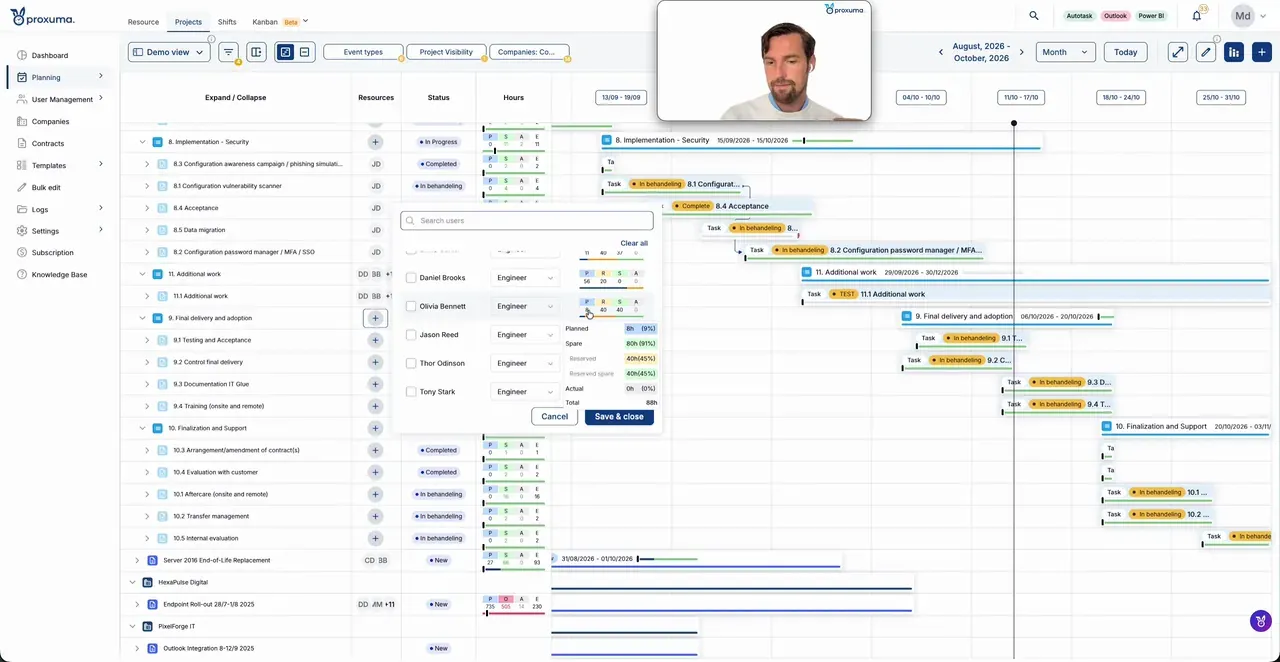
How to plan a project, paused on the assign picker: each person’s planned, reserved and spare hours for the dates of the phase.
Running sprints? See how Sprints work on the Kanban board, with a 6-minute video.
  • Who is free for each task’s dates, reserved hours included
  • Project Hours visible per project, at a glance
  • Drag to reschedule; stretch or shrink tasks visually
  • Every edit lands in Autotask in real time

Trusted by

  • IT Synergy
  • Cubics
  • VanRoey
  • Conxion
  • Velzart
  • Lemontree
  • HIG
  • AppSys ICT Group
  • Intec Business
  • Blue Arc IT Solutions
  • FIT Technologies
  • Lancom
  • Pritech
  • Steentjes Groep

Project creation

From template to timeline in minutes.

Build once, run every time. Create a template from scratch or generate one from a past project, Proxuma combines it with your Autotask templates and drops every phase and task onto the schedule, fully aligned. Then open it in Single project view to zoom in on just that project.

  1. Pick a starting point Any project can serve as a template, or choose one from your library.
  2. Choose your phases Keep the phases you need, adjust the rest, add new ones at will.
  3. Add tasks from a task template Click a phase and add a task from a task template that fills in the empty fields. When you save, Proxuma checks for scheduling conflicts, reserved capacity included.
  4. Staff it on the timeline Assign people to a task or a whole phase right from the timeline. The picker shows each person’s planned, reserved and spare hours for that period.
Watch it in the walkthrough (8:38)

app.proxuma.com/planning/projects

Assign + reserved capacity

Assign the task to who is actually free.

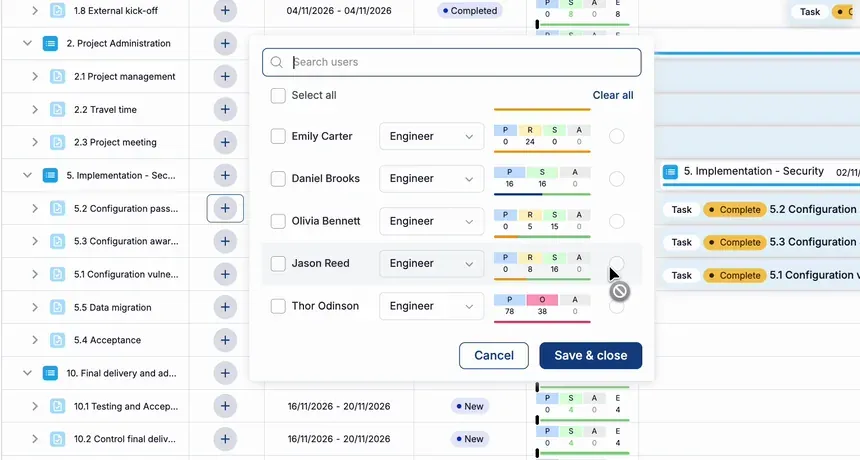
Click the plus on an unassigned task and Proxuma shows everyone’s availability for the period of that task. It counts their Outlook invites and service calls, and now also the tickets and tasks they are assigned to, using their dates and estimated hours. That reserved work shows in orange, so you pick someone who has room.
  • Availability for the exact dates of the task, per person
  • Reserved hours from assigned tickets and tasks, no service call needed
  • A task with 4 estimated hours over 4 days reserves 1 hour a day
Watch it in the walkthrough (2:20)
app.proxuma.com/planning/projects
Assigning project task 5.2 in Single project view: the user picker shows each person’s hours for the dates of the task, reserved hours in orange

Outlook + project tasks

Ready to commit? Make it a service call.

An assigned task reserves its hours, but nobody gets an Outlook invite for it. Open the task in the Gantt and the engineer’s week sits right under it: tickets, time off and reserved hours. Pick a free slot, add a service call and save. The call sits under the task and the invite goes out. From there you can also update the task’s status, for example to In progress.

  • Service call prefilled from the task: name, date, company and engineer
  • Native Outlook invite with the Autotask deeplink, Teams meeting if you want one
  • Move the task and its service calls move with it
Watch it in the walkthrough (3:27)

app.proxuma.com/planning

Resource management

Capacity becomes an exact science.

Service calls, the Outlook items you select (PTO, holidays, internal meetings) and the reserved hours of assigned tickets and tasks add up to everyone’s real capacity. The capacity view shows it per person, per day: planned, spare and actual hours, with the percentage next to it.

  • Switch on reserved capacity and every day gets two more lines: the reserved hours and the spare hours that are actually left
  • The week chart adds it up for the whole team, per day: planned, reserved, actual spare and overbooked
  • Click a day to see what is behind the number: the tickets, tasks, time off and appointments, and open any of them from there
  • The same numbers sit in the assign picker: each person’s capacity for the dates of a project task, overbooked in red

app.proxuma.com/planning/resources

Reserved capacity

Not scheduling service calls? Let Proxuma do the planning.

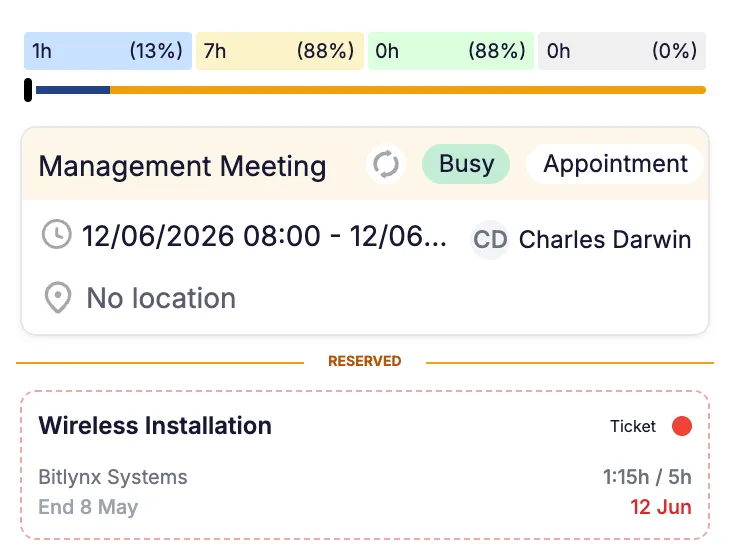
Estimated hours from assigned tickets and tasks are automatically allocated across future capacity, revealing resource demand before work is scheduled. As long as PTO and meetings are in Outlook, you do not need a service call for everything.

Reserved Capacity doesn’t add work to your team’s plate, it surfaces the work that was already there, in time to plan around it. One condition: your tickets and tasks need estimated hours and start and end dates that make sense. Garbage in, garbage out.
Explore Reserved Capacity Watch it in the walkthrough (5:10)
One resource's day: a scheduled meeting above the amber RESERVED divider, a reserved ticket below showing allocated versus estimated hours

Bulk edit

Project delayed? Move it in one go.

Select the remaining tasks and shift them forward by a week. Attached service calls move with them, and any resulting calendar conflicts can be easily managed.

  • Close multiple projects at once
  • Turn site visits into Teams meetings, link inserted for you
  • Move half a project, or set a new start and end date
  • Hand one person's projects to someone else
  • Clean up someone’s overdue tasks: move them to the future, give them to someone else or close them as completed
Watch it in the walkthrough (8:00)

app.proxuma.com/planning/projects

Autotask sync

Both directions, no waiting.

API and webhook connections to your Autotask reflect every change immediately, in both directions. You drag and drop; Proxuma does the rest in the background.

Planned in

proxuma.

Drag, drop, bulk edit. Changes push the moment you make them.
Source of record

Autotask

Projects, tasks and time entries stay exactly where your MSP already keeps them.
  • Outlook included in the loop
  • Single source of truth for availability
  • No data migration

Customers

What MSP leaders say about running projects.

When a lot of projects get approved at once and I have to plan them straight away, Proxuma helps me enormously.

Planning

Robert Planner · Lancom
Lancom
Engineers can work at Projects but also work on day-to-day tasks and tickets. The combined overview of both tasks and tickets and smart filters helps our planners to plan fast and reschedule even faster. As an owner I love that I have a live overview of the workload, and the automation saved us so much time. Definitely give it a try!

Planning

Luc Pijls Owner · Arrows ICT
Arrows ICT
We have used Proxuma since the very beginning, starting with version 1. Combined with Autotask PSA, it has made creating and planning projects significantly easier. The intuitive, colour-coded capacity overview gives us a clear view of our team's availability and helps us plan resources with confidence. Proxuma has become a valuable part of how we manage projects and capacity at Perspektiva IT.

Resource management

Jonas Christoffersen Head of Operations & Projects, Denmark · Perspektiva IT
Perspektiva IT
Proxuma brings our planning, projects and capacity together in one place. It's the only complete tool we have.

Planning

Bram Beukers Owner / planner · Network Company
Network Company
The automation around keeping customers informed is a key part of how we deliver projects.

Project management

Tony Houlihan Projects lead, UK · TwentyFour IT
TwentyFour IT
It's a multi-layered Gantt chart that builds itself, as long as the information's in there. I really like that.

Project management

Andrew Byrne Project engineer, USA · Align Layer 9
Align Layer 9
When a lot of projects get approved at once and I have to plan them straight away, Proxuma helps me enormously.

Planning

Robert Planner · Lancom
Lancom
Engineers can work at Projects but also work on day-to-day tasks and tickets. The combined overview of both tasks and tickets and smart filters helps our planners to plan fast and reschedule even faster. As an owner I love that I have a live overview of the workload, and the automation saved us so much time. Definitely give it a try!

Planning

Luc Pijls Owner · Arrows ICT
Arrows ICT
We have used Proxuma since the very beginning, starting with version 1. Combined with Autotask PSA, it has made creating and planning projects significantly easier. The intuitive, colour-coded capacity overview gives us a clear view of our team's availability and helps us plan resources with confidence. Proxuma has become a valuable part of how we manage projects and capacity at Perspektiva IT.

Resource management

Jonas Christoffersen Head of Operations & Projects, Denmark · Perspektiva IT
Perspektiva IT
Proxuma brings our planning, projects and capacity together in one place. It's the only complete tool we have.

Planning

Bram Beukers Owner / planner · Network Company
Network Company
The automation around keeping customers informed is a key part of how we deliver projects.

Project management

Tony Houlihan Projects lead, UK · TwentyFour IT
TwentyFour IT
It's a multi-layered Gantt chart that builds itself, as long as the information's in there. I really like that.

Project management

Andrew Byrne Project engineer, USA · Align Layer 9
Align Layer 9
Show all 12 reviews
Proxuma has transformed how we manage projects and coordinate service calls. It centralizes planning, improves time visibility, and optimizes resources across Autotask and Outlook. The real-time integration keeps schedules accurate, and the support team is responsive and proactive. A reliable, strategic tool for our operations.

Project management

Peter Durnil Operations Director, USA · Locknet Managed IT
Locknet Managed IT
One of our biggest challenges was understanding resource capacity and accurately planning project work in Autotask. Proxuma provided the visibility we needed to confidently allocate work, balance workloads, and improve project planning. We were pleasantly surprised by the value Proxuma's Shifts brought as well. It has become an essential tool for coordinating and managing our support team's day-to-day schedules.

Resource management

Ali Tubbs COO, USA · FIT Technologies
FIT Technologies
Autotask just isn't built for this. That's exactly why we signed up for Proxuma.

Why Proxuma

Stuart Potter Project lead, UK · Iglu Tech Group
Iglu Tech Group
We get live support instead of being handed a product and told good luck. My expectations are blown.

Support

Jerry / Matt Owner, USA · Knox Technology
Knox Technology
Proxuma simply offers so much more than the competitors we looked at.

Why Proxuma

Daniel Jacobsen Owner, Denmark · RIT
RIT
We have used Autotask for many years but never knew that we wasted so much valuable time with repetitive tasks. We love Proxuma!

Why Proxuma

Luc Pijls Owner · Arrows ICT
Arrows ICT

Built around your workflow

However you run projects, it fits.

Different MSPs run Autotask differently. These are the pieces planners lean on day to day.
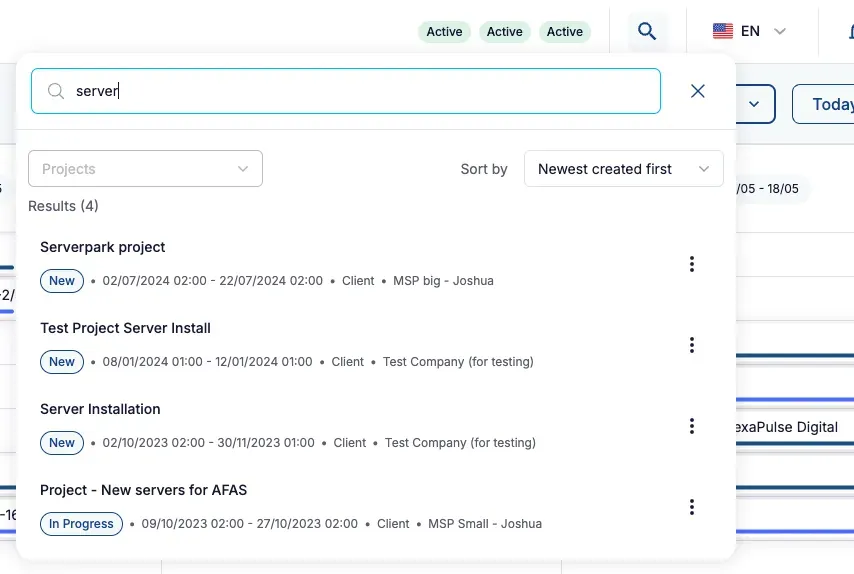
Advanced filters

app.proxuma.com/planning/projects
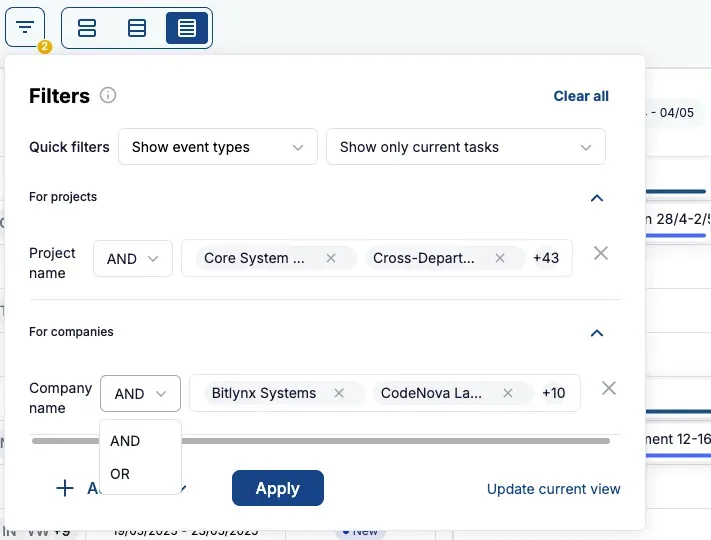
Filtered project views for employee reviews, forecasts and team planning

Filters compose into the workflows you actually run:
  • Quarterly review per employee
  • Monthly forecast per customer
  • My active projects
  • My team’s projects next month

Your workflow

app.proxuma.com/planning/projects
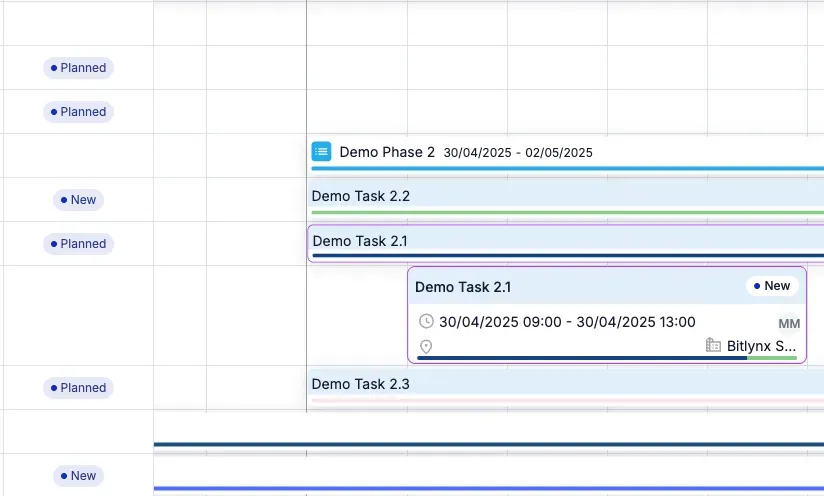
Proxuma adapting to different Autotask workflows, with filters and bulk edit

Proxuma suits every kind of project manager working with Autotask.
  • Not using the project module? No problem.
  • Not using templates? We’ve got you.
  • Old projects to clean up? Bulk edit is here to help.
  • Not using service calls for tasks? You’re not alone.

Speed

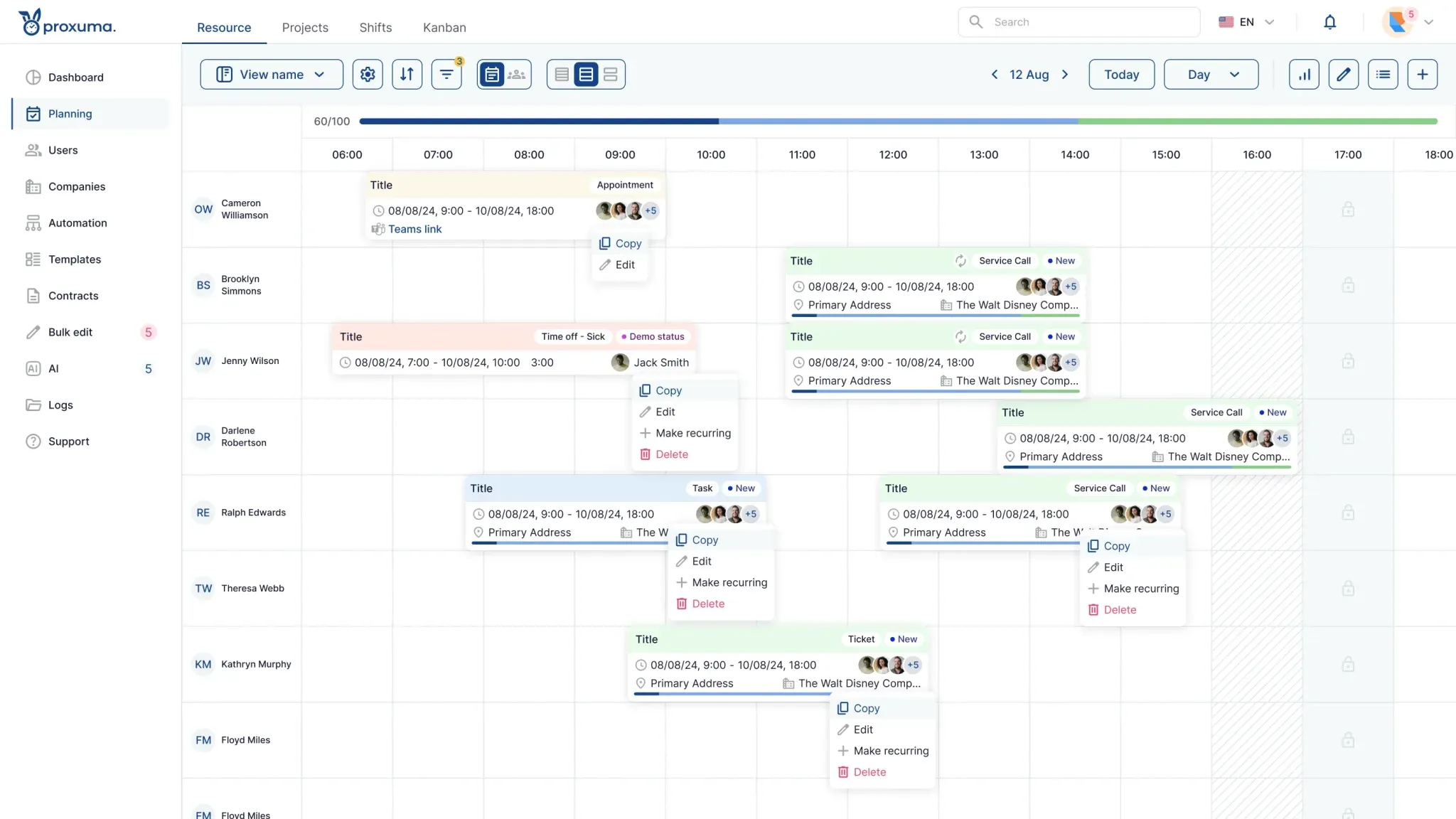
app.proxuma.com/planning
Fast drag-and-drop planning with live Autotask sync

Dragging and dropping is instant, while syncing to Autotask and Outlook runs in the background. New Autotask tasks are fetched every few minutes, so Proxuma stays your single source of truth for availability.
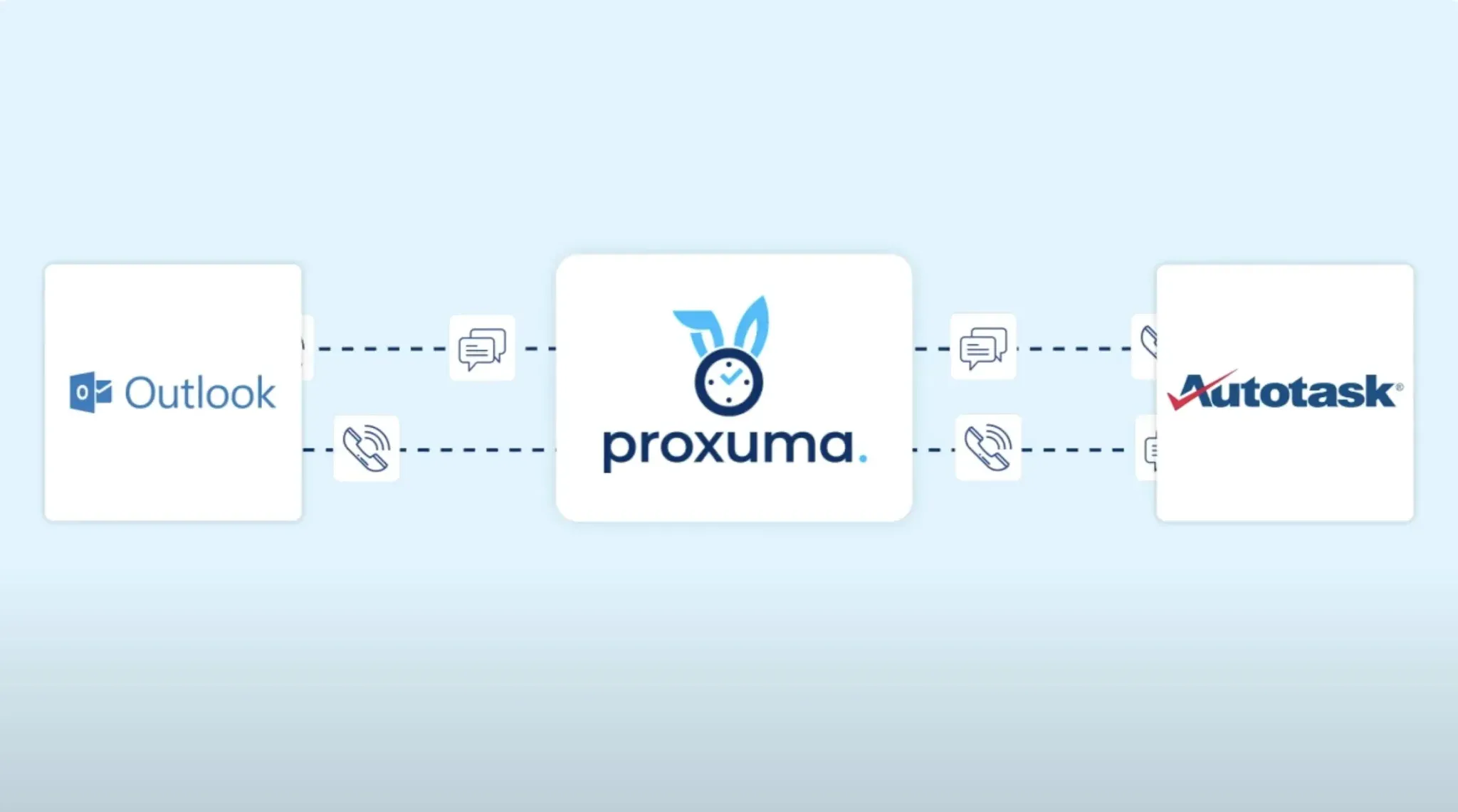
Outlook control

app.proxuma.com/settings/outlook
Proxuma syncing Autotask tasks and tickets with the Outlook calendar

Filter out private appointments so you only see what’s relevant to you as a project manager. Invites go out from a shared address and carry exactly the Autotask fields you choose. More on the Outlook integration.

Book a demo

See it the way you run it.

Each MSP runs Autotask differently. In a demo, our specialists take your workflow and show you:

  • Your current workflow, improved Each MSP is different, let’s see if we do it your way.
  • Projects from beginning to end Creation, management and completion in one tool.
  • Service calls with project tasks The way to stay inside your time budget.
  • Capacity forecasting on planned and reserved work When can you promise a new project?
  • Building from scratch or from a template Even if you don’t use the project module today.
Book a demo Watch demo
Schedule a Proxuma demo to explore project and resource planning in Autotask

FAQ

Frequently asked questions

What if I don’t like Proxuma?
Testing it is low-impact: after connecting, you can start immediately and see if you get value out of it. An unused Proxuma instance doesn’t touch your Autotask at all. Specialists are a chat away inside the product, and our Autotask consultancy Dxfferent offers free intake calls.
How much time does it take to implement?
Setup is done within an hour: register, connect, go. The initial sync can take up to 24 hours depending on the size of your database. Premium onboarding is free, book an onboarding call and we’ll get you started.
I don’t use Autotask, can I use Proxuma?
Autotask is the first PSA we fully connect with. Proxuma is built for multiple integrations, TopDesk, HaloPSA, Zendesk, Monday, ConnectWise and Jira have all been suggested, and demand drives the order. Gather a group of interested users and we’ll move it up the list.
Can I create and manage projects from Proxuma?
Yes. Create from scratch or from a template, open the project in Single project view and assign each task to someone who is free for its dates. Under a phase you can add a task from a task template, and saving checks for scheduling conflicts, reserved capacity included. Bulk edit moves tasks and their attached service calls together. From beginning to end, the project happens in Proxuma.
Do I need service calls to plan on capacity?
No. Assign tickets and tasks without a service call and Proxuma reserves their estimated hours across their dates. As long as PTO and meetings are in Outlook, all of it is taken into account. What it does need is estimated hours and start and end dates that make sense, otherwise it is garbage in, garbage out. More on Reserved Capacity.
How much does Proxuma cost?
No minimum purchase, and a 14-day free trial with as many live sessions as you want. Pricing is per engineer, planner and project manager, so you choose who gets a license and at what level. A 12- or 36-month commitment adds an automatic 10% or 20% discount. See pricing.
Who in my MSP uses Proxuma?
Planners and project managers first, nobody else has to adopt it. Engineers can see their timeline and projects in Proxuma, and every Outlook invite carries a deeplink to the scheduled ticket, so they’re one click from where you want them to be.
Is Proxuma still in beta?
Out of beta and fully live, used by 80+ MSPs around the world, with a full-time development team shipping improvements. Missing a feature? Ask.

Is your question not listed? Contact us.

The Proxuma founders, Autotask consultants from Dxfferent

The story of Proxuma

Built by Autotask consultants.

After helping 200+ companies optimise Autotask through his consultancy Dxfferent, Jasper kept meeting the same problem: everyone loves Autotask, but insight, grip and planning fall short, which makes the work time-consuming and annoying.

Clients kept asking for a more efficient planning and project management process. So we built Proxuma, first for them, now available for you as well.

This comes at exactly the right moment. I’ve just assigned all the resources and can now plan everything cleanly from week three on.
MSP customer Project-driven MSP, Netherlands

Get started

See your own projects in it.

Connect your Autotask and we’ll walk your real projects through Proxuma. Setup takes under an hour; the sync does the rest.