New module

The Autotask kanban your MSP deserves

Kanban for IT service teams. Tickets, tasks, and service calls from Autotask on a board you control. Your columns, your card layout, your swimlanes.


  • Autotask integration
  • 14-day free trial
  • EU + US hosted
  • Autotask
  • Proxuma

Trusted by

  • IT Synergy
  • Cubics
  • VanRoey
  • Conxion
  • Velzart
  • Lemontree
  • HIG
  • AppSys ICT Group
  • Intec Business
  • Blue Arc IT Solutions
  • FIT Technologies
  • Lancom
  • Pritech
  • Steentjes Groep

Live demo

Drag a card. Feel the difference.

Drag cards left to right to update their Autotask status. Or top to bottom to move between swimlanes. Try it yourself

To Do 3
Server outage Ticket New
⏱ 05.08 12:25 pm DD Drew Davis
P1 - Critical Byte IT
Network switch failure Ticket New
⏱ 05.06 02:54 pm MH Marcus Hill
P1 - Critical Spark IT
Reserve capacity task Task Backlog
⏱ 05.08 11:59 am AT Ana Torres
P1 - Critical Forge Networks
In Progress 3/3
Database failover drill Ticket In Progress
⏱ 1h overdue JRAT Jon Reeves, Ana Torres
P1 - Critical Halcyon Networks
Office VLAN migration Task In Progress
⏱ 06.02 CPBW Casey Park, Ben Wallace
P1 - Critical Cascadia Tech
Onboarding: new hires Task In Progress
⏱ 05.02 TL Tara Lopez
P1 - Critical Anvil Systems
Waiting Customer 1
SonicWall RMA Ticket Waiting Vendor
⏱ 04.28 SCYI Sam Chen, Yara Ibarra
P1 - Critical Northwind IT
Done 1
Internet outage Ticket Resolved
⏱ 05.06.2026 DRPP Devon Riley, Priya Patel
P1 - Critical Beacon Cloud

To Do 2
Printer queue stuck Ticket New
⏱ 05.09 09:15 am PP Priya Patel
P2 - High Lakeshore Digital
Email rules audit Task New
⏱ 05.12 CP Casey Park
P2 - High Meridian IT
In Progress 2/3
Firewall rule cleanup Ticket In Progress
⏱ 05.10 02:00 pm BWDD Ben Wallace, Drew Davis
P2 - High Summit Systems
New laptop deployment Task In Progress
⏱ 05.14 TL Tara Lopez
P2 - High Byte IT
Waiting Customer 1
Confirm site visit Service Waiting Customer
⏱ 05.08 MH Marcus Hill
P2 - High Forge Networks
Done 0

To Do 2
Quarterly backup audit Task New
⏱ 05.20 SC Sam Chen
P3 - Medium Redwood MSP
Replace office UPS Ticket Backlog
⏱ 05.22 DR Devon Riley
P3 - Medium Beacon Cloud
In Progress 1/3
Office 365 license cleanup Task In Progress
⏱ 05.18 AT Ana Torres
P3 - Medium Anvil Systems
Waiting Customer 1
Wi-Fi survey: west wing Service Waiting Customer
⏱ 05.25 MH Marcus Hill
P3 - Medium Lakeshore Digital
Done 1
Quarterly report PDF Task Resolved
⏱ 05.04 PP Priya Patel
P3 - Medium Meridian IT
Drag a card between columns · click a swimlane header to expand

Watch it in action

See the Autotask kanban board in five minutes.

Drag-drop, swimlanes, card customization, saved views. One walkthrough, no fluff.
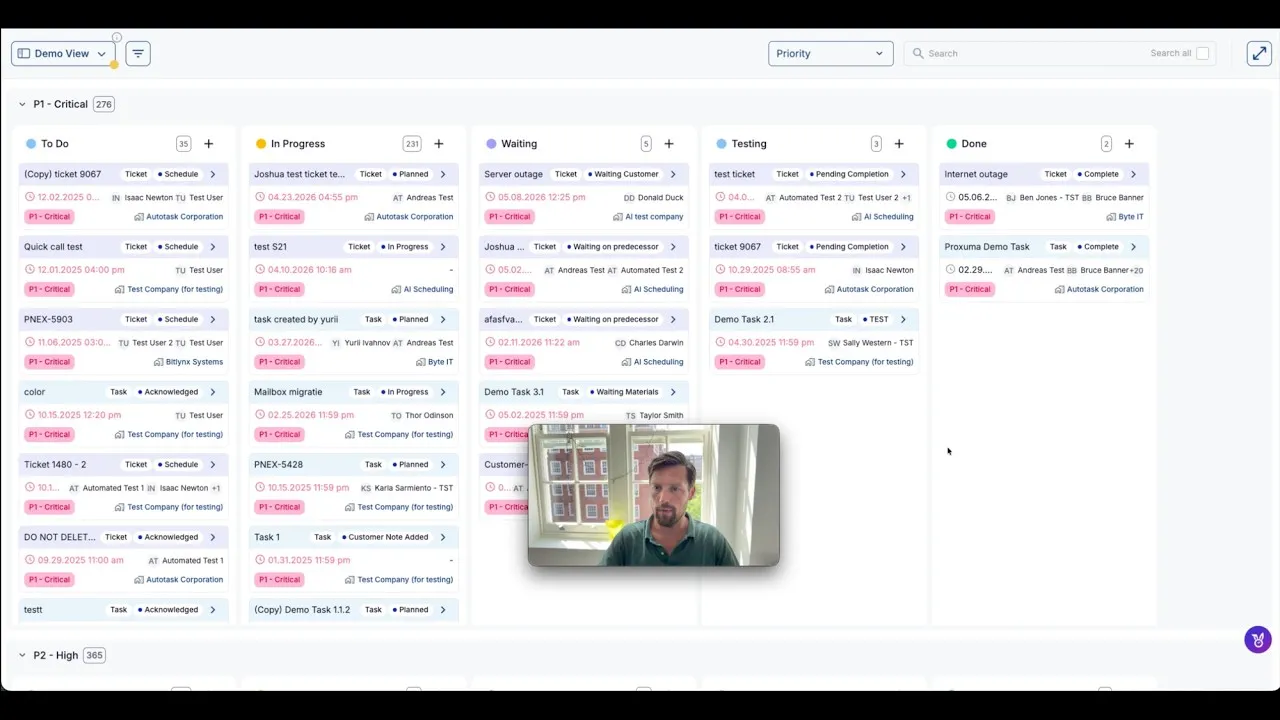
Proxuma Kanban walkthrough

9

Swimlane boards

2.4s

Median sync latency with Autotask

1086+

Possible board configurations

99.97%

Uptime · EU + US multi-region

Swimlanes

9 ways to see your work.

By priority on Monday morning. By technician at standup. By project when the client calls. By queue when the helpdesk is drowning. Switch in one click. Collapse the lanes you're not using. The board remembers your last view per workspace.

Example

Your MSP has six open tickets on a Tuesday morning. Two are P1 incidents, four are routine moves/adds. Group by priority: the P1s sit alone in a red lane at the top. Group by project: all six cluster under one migration job. Group by technician: you see who's overloaded before standup starts.

Board Settings

Organize your board into horizontal lanes for better visibility.

P1 - Critical 63
P2 - High 164
P3 - Medium 2,769
P4 - Low 89
Standard 412
Unassigned 7

Customization

Your board, your rules.

"In Progress: Awaiting Customer Response" is not a column you can dispatch from. Group the statuses you have into the columns you actually use.

A · Columns

Columns hold sub-statuses.

One column, many statuses. Map "In Progress: Working", "In Progress: Awaiting Approval", and "In Progress: Blocked" into one "In Progress" column. The card carries the sub-status as a tag.

B · Card layout

Cards show what matters to you.

4 corner fields, up to 10 expanded detail rows, and linked service calls. Configure separately for tasks and tickets.

C · Swimlanes

9 ways to group your board.

Re-stack the board around what matters today. By person, project, customer, or queue. Switch in one click, collapse what you don't need. The first four cover most days. The rest earn their keep on the hard days.

Sprints

Plan your service desk in sprints.

Autotask has no sprint board, so planning ends up in a spreadsheet. Switch the Kanban board to sprint mode and your team works one- or two-week blocks of tickets and tasks from one shared board.

One board for the whole team

Tickets and tasks from every queue, in columns that follow your own Autotask statuses.

See who is overbooked

Capacity per person for every sprint, counting service calls, Outlook invites and assigned work with a due date.

Reassign by dragging

Swimlanes by assignee or queue. Drag a ticket to someone else, or from Level 1 to Level 2.

Time gets logged

Completing a ticket opens a log-time pop-up, with time entry templates to make it quick.
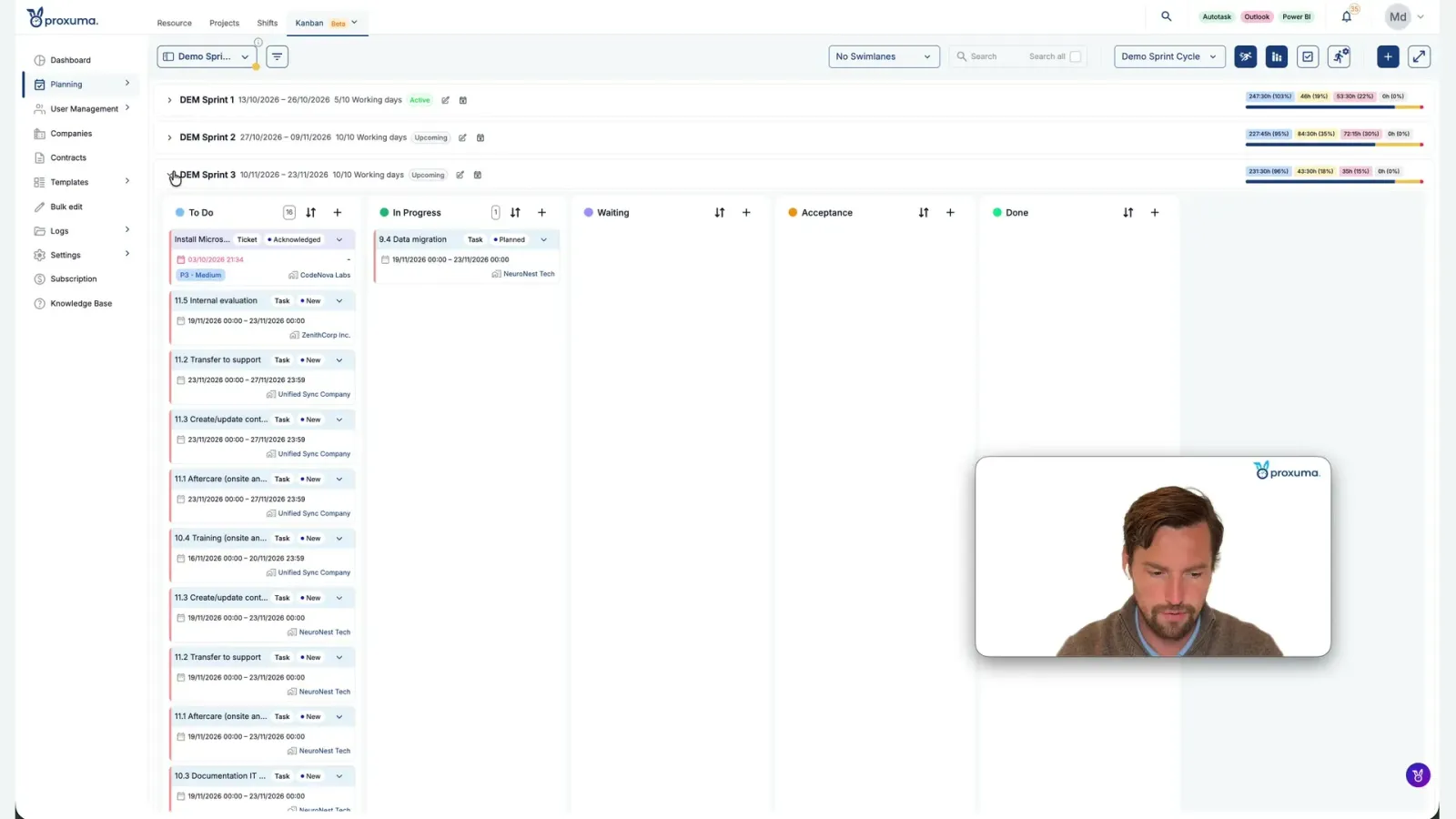
See sprint planning Book a demo
Proxuma Kanban board in sprint mode, with three two-week sprints and a capacity bar per sprint
6 minutes with Max: sprint mode on the Kanban board.

Sync

Two-way Autotask sync.Two seconds.

Move a card on the board, the ticket moves in Autotask. Log time on the card, it shows up in the PSA. Status, assignments, due dates, all the same data in both directions. Some tools keep their own ticket store and reconcile with Autotask hourly. We don't. The board reads and writes your PSA directly. There is no second database.

Autotask Webhooks API SCIM / SSO

Proxuma

Kanban

Card moved "In Progress"

status_id: 5
assignee: kvasilenko
started_at: 09:07
Autotask

Ticket

T-42891 · status updated

Status: In Progress
Owner: K. Vasilenko
Sync · 1.8s ago

Customers

What MSP leaders say about the board.

This is exactly the board I wanted. I just drag tasks from to-do to in progress.

Kanban

Davy Aerts Project manager · Cheops
Cheops
With a big workload it's important to be 100% in control, but it's hard to have a clear overview. Proxuma gave us back control, and through simple drag and drop features planning a task is done within seconds. We work with Autotask and love the full integration directly from the dashboard.

Planning

Diederik Twickler CEO · Campai
Campai
Proxuma allows us to use Kanban the way it's meant to be: fully customizable to our way of working and really smooth!

Kanban

Nick Alles Teamlead Projecten · Aurora ICT
Aurora ICT
Autotask just isn't built for this. That's exactly why we signed up for Proxuma.

Why Proxuma

Stuart Potter Project lead, UK · Iglu Tech Group
Iglu Tech Group
We get live support instead of being handed a product and told good luck. My expectations are blown.

Support

Jerry / Matt Owner, USA · Knox Technology
Knox Technology
Proxuma simply offers so much more than the competitors we looked at.

Why Proxuma

Daniel Jacobsen Owner, Denmark · RIT
RIT

Customers

What MSP leaders say about the board.

This is exactly the board I wanted. I just drag tasks from to-do to in progress.

Kanban

Davy Aerts Project manager · Cheops
Cheops
With a big workload it's important to be 100% in control, but it's hard to have a clear overview. Proxuma gave us back control, and through simple drag and drop features planning a task is done within seconds. We work with Autotask and love the full integration directly from the dashboard.

Planning

Diederik Twickler CEO · Campai
Campai
Proxuma allows us to use Kanban the way it's meant to be: fully customizable to our way of working and really smooth!

Kanban

Nick Alles Teamlead Projecten · Aurora ICT
Aurora ICT
Autotask just isn't built for this. That's exactly why we signed up for Proxuma.

Why Proxuma

Stuart Potter Project lead, UK · Iglu Tech Group
Iglu Tech Group
We get live support instead of being handed a product and told good luck. My expectations are blown.

Support

Jerry / Matt Owner, USA · Knox Technology
Knox Technology
Proxuma simply offers so much more than the competitors we looked at.

Why Proxuma

Daniel Jacobsen Owner, Denmark · RIT
RIT
Show all 8 reviews
We have used Autotask for many years but never knew that we wasted so much valuable time with repetitive tasks. We love Proxuma!

Why Proxuma

Luc Pijls Owner · Arrows ICT
Arrows ICT
One of our biggest challenges was understanding resource capacity and accurately planning project work in Autotask. Proxuma provided the visibility we needed to confidently allocate work, balance workloads, and improve project planning. We were pleasantly surprised by the value Proxuma's Shifts brought as well. It has become an essential tool for coordinating and managing our support team's day-to-day schedules.

Resource management

Ali Tubbs COO, USA · FIT Technologies
FIT Technologies

Card Layout

Every card shows what you need.

The corner fields are the four things your dispatcher reads first. The expanded rows are the next ten things your tech reads when they open a card. Linked service calls show up on the card, not in another tab. Configure separately for tasks and tickets.

Two teams, one board

A Tier 1 helpdesk team at a 12-person MSP runs corner fields as: end date, primary resource, priority, company. Fast triage, nothing extra.

The Tier 3 escalation team at the same MSP runs: estimated remaining hours, PO number, customer technical contact, last activity timestamp. Same board. Different workspace. Different defaults.

Board Settings

Card Preview
Title of ... Task In Progress
⏱ 10/08/... JSAS
High Forge Networks
Project: Office Renovation
Task type: General
Department: IT Services
📞 Service calls (1/5)
Card Settings
Top Fields
Bottom Fields
Expanded Fields 3/10
Project
Task type
Department

Before / After

A dispatcher's morning, before and after.

Before Proxuma

The 8:30 status call

  • Five tabs open: PSA, calendar, Teams, spreadsheet, ticket list.
  • "Who's on the Henderson firewall?" Nobody knows without opening the ticket. Full-page reload. New tab.
  • P1 incident hidden three pages deep in the queue. Column profile didn't save again.
  • Capacity guessed by gut. Tech booked into their lunch break. Again.
  • Status update typed manually into the PSA after the call ends.

With Proxuma Kanban

One board, one minute

  • One screen. Priority-grouped, technician-aware, SLA-flagged.
  • Drag a card. Assignment, status, and time entry all sync to Autotask.
  • Critical column flashes red when WIP exceeds capacity. Reroute before standup ends.
  • Board tells you who's free and what's overdue. No guessing.
  • Standup is now four minutes. Coffee still warm.
Pricing

Simple pricing. One admin required.

One admin license to run the account and connect Autotask. Everyone else on the board pays a flat per-user rate. No tiers. No feature gates.

10% off yearly. 20% off 36-month. Full pricing calculator
Admin
€60/mo
Per user
€20/mo
Total
€160/mo

Connect Autotask and dispatch from the board in a few hours.

Three OAuth clicks for the Autotask connection. A column mapping that imports your existing statuses. There is no migration, because the board reads your live PSA.