
Daily
Daily resource rotation
A different person each day. Good for first-line phone duty where you want the desk shared evenly across the week.
Proxuma Shifts
Shifts add rostering to Proxuma, and every shift carries a capacity impact. So when the planner assigns work, the spare hours on screen are real. Set rotations once, roll them out months ahead, and let the unpopular slots land on everyone in turn.
app.proxuma.com/planning/shifts
Trusted by










Explainer video
One short walkthrough on the real Shifts screen. The calendar, the coverage colours, and how capacity impact feeds planning. No sign-up to watch.
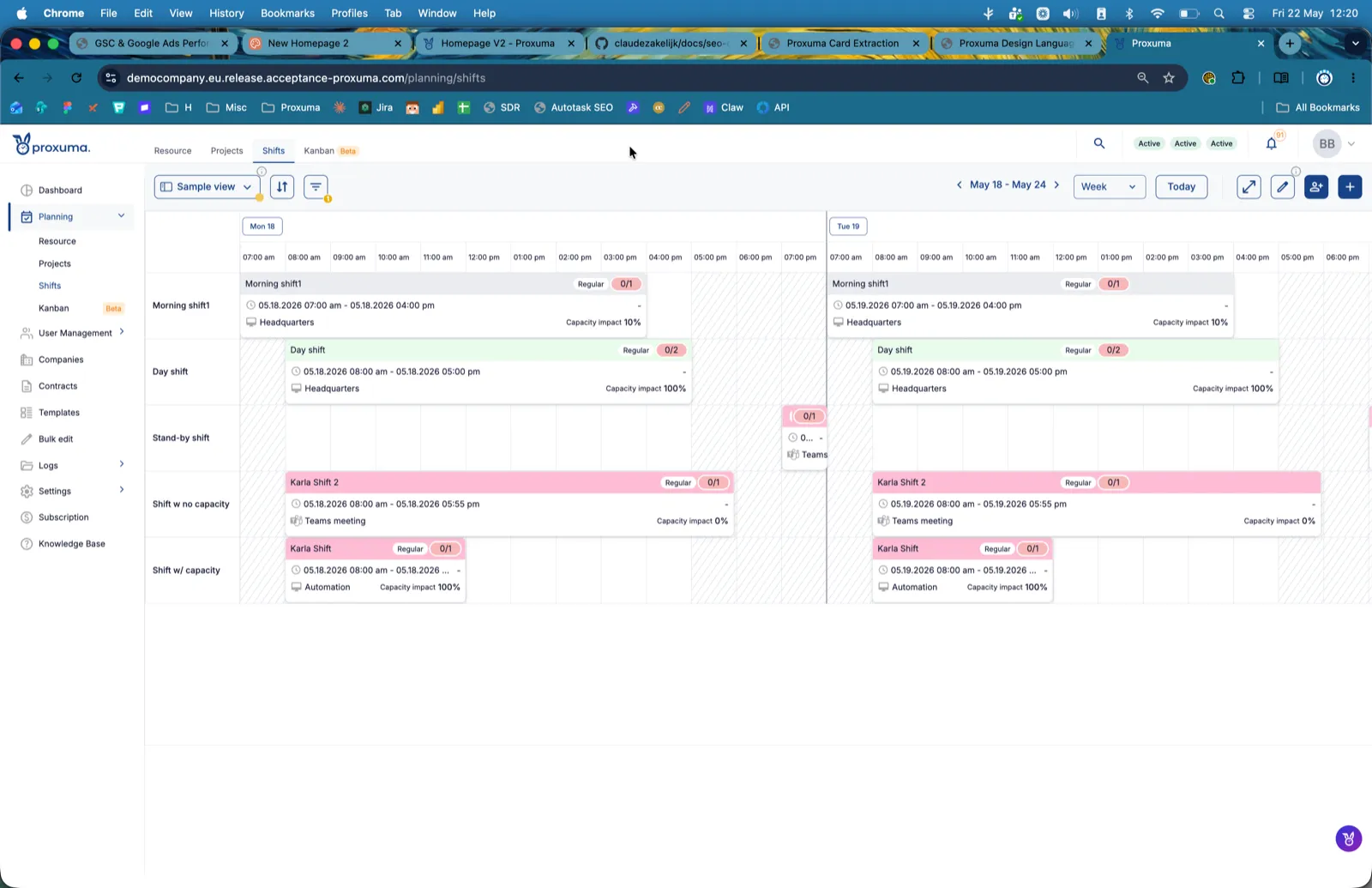


The shift calendar
Each shift schedule gets its own row. Morning, day, standby and on-call sit one above the other, with the weekdays running across. The whole week reads left to right, so you see who is covered and where the gaps are without opening a single thing.
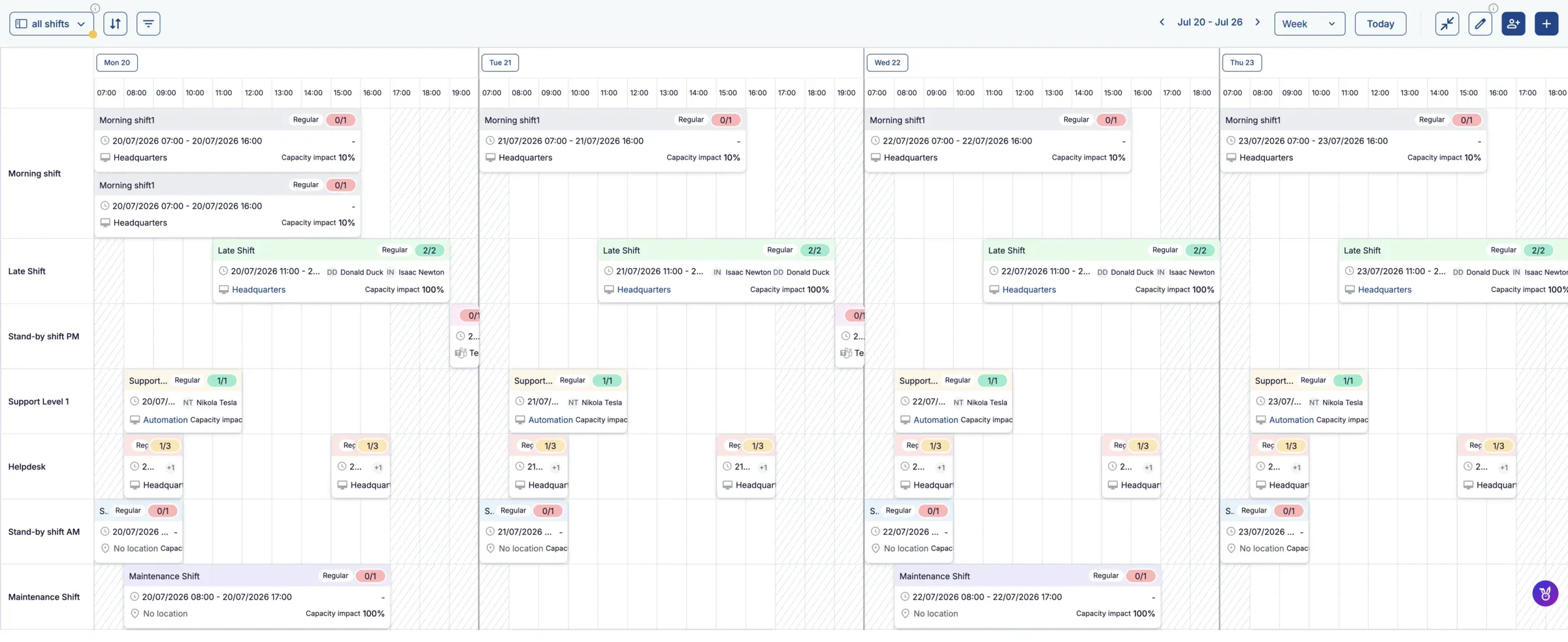
Coverage & rotation
Coverage reads at a glance: green when a shift is full, yellow when it is partly filled, red when nobody is on it yet. Rotation decides whose turn it is, so Friday on-call does not always land on the same engineer.
Coverage this week
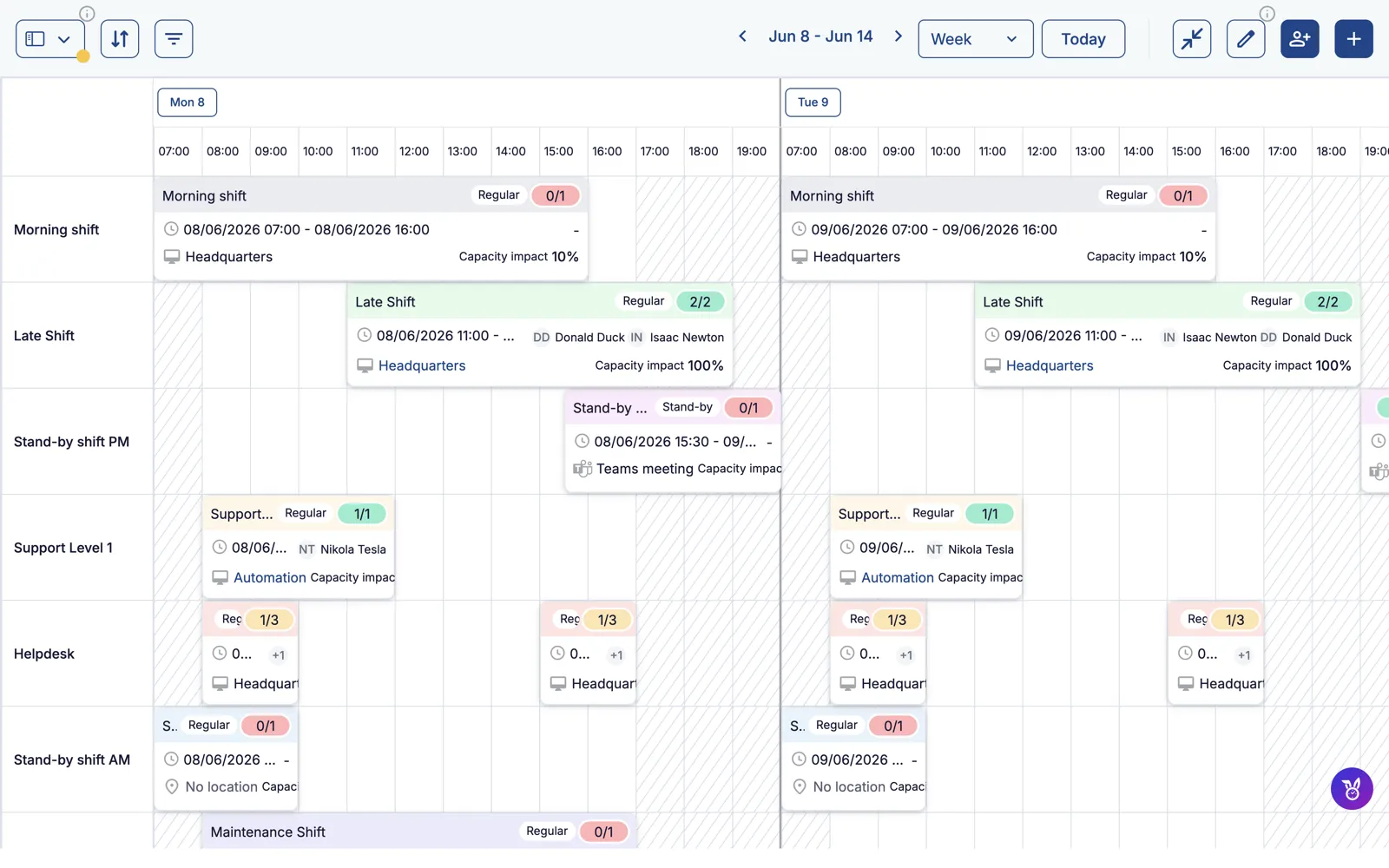
Pick the rotation that matches how the team shares the load. Proxuma fills each generated shift with the next person in line.
Daily
Weekly
Fixed
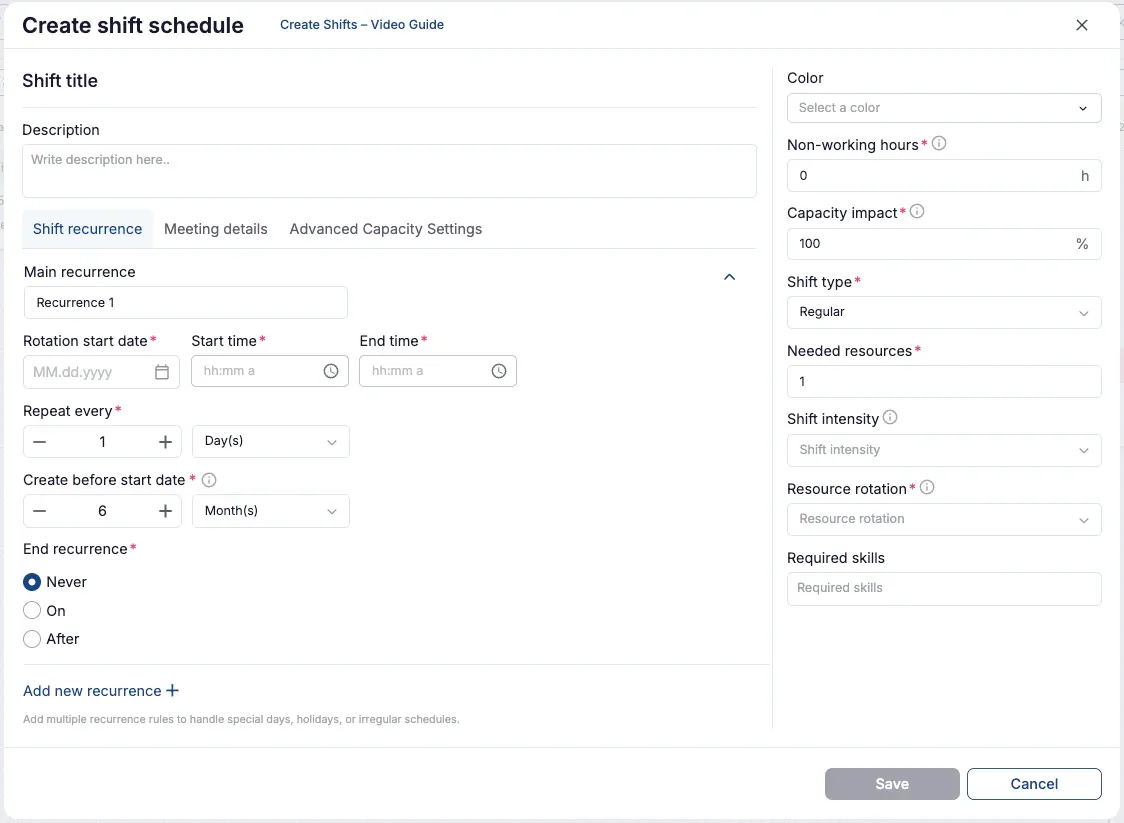
The shift editor
A shift schedule is a template. You set the recurrence, the capacity impact, the type and the rotation, and Proxuma generates the individual shifts from it. Build the rota once and let it run months ahead.
Capacity impact
An Excel rota and an Outlook block both show that someone is busy. Neither one tells the planner how busy. In Proxuma every shift carries a capacity impact, and that number flows straight into the planning screen.
Same person, different shift, different math. Because the impact lives on the shift, the planner reads true spare hours per engineer per day, before a single ticket is assigned.
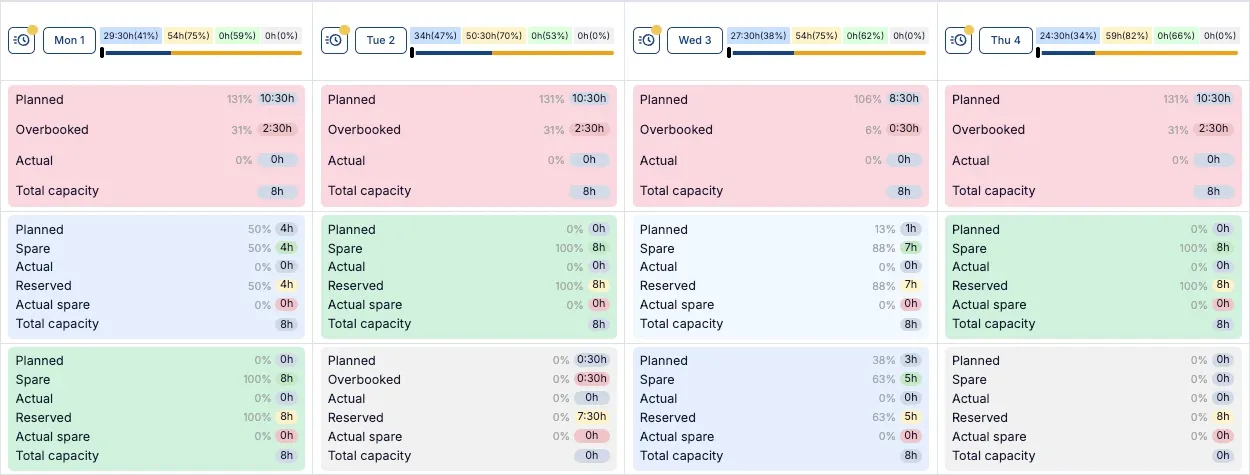
Per-role capacity
The same shift does not hit everyone the same way. Turn on advanced capacity settings and set the impact by role or department. A senior on monitoring might lose half a day, a junior the whole one.
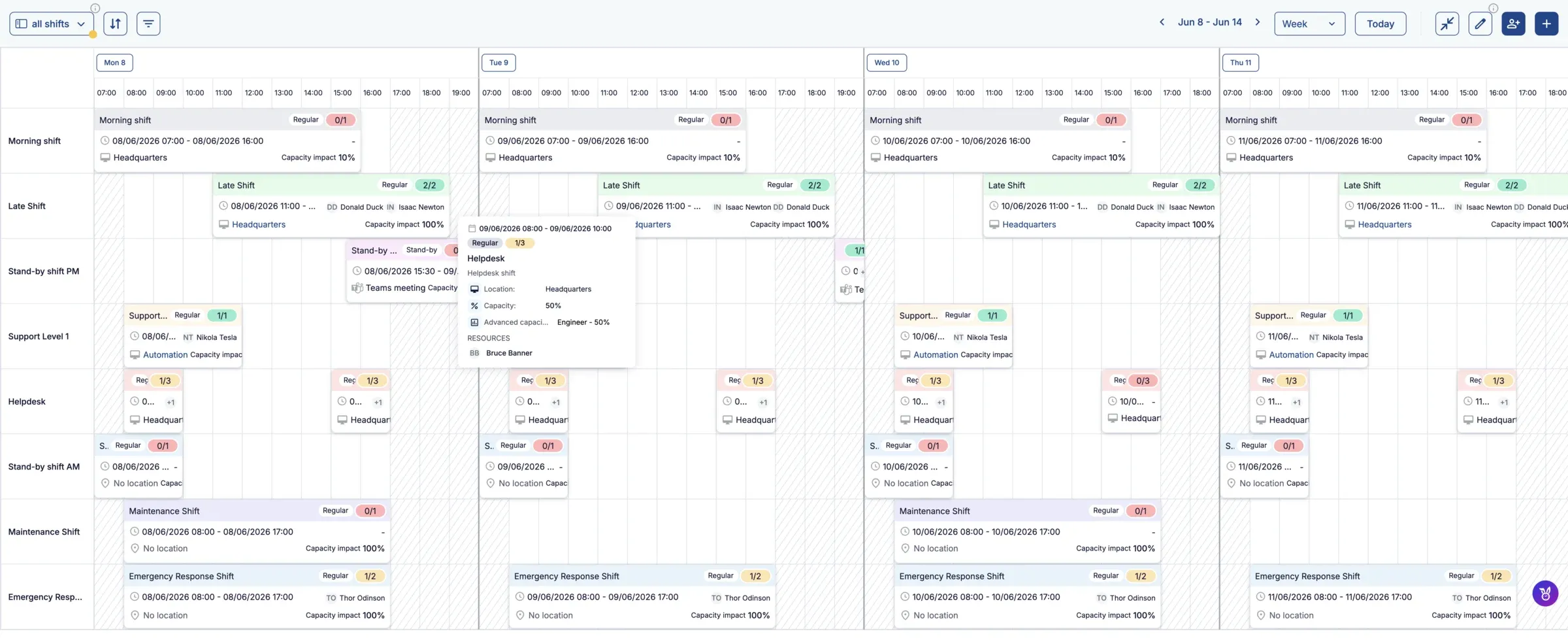
Customers
Proxuma has helped us get a clearer view of scheduling, shifts and resource capacity across the team. The team have been very responsive to feedback and willing to work through any issues with us. For us, the value is in making the operational picture easier to see, without turning it into micromanagement.
Resource management

One of our biggest challenges was understanding resource capacity and accurately planning project work in Autotask. Proxuma provided the visibility we needed to confidently allocate work, balance workloads, and improve project planning. We were pleasantly surprised by the value Proxuma's Shifts brought as well. It has become an essential tool for coordinating and managing our support team's day-to-day schedules.
Resource management

Autotask just isn't built for this. That's exactly why we signed up for Proxuma.
Why Proxuma

We get live support instead of being handed a product and told good luck. My expectations are blown.
Support

Proxuma simply offers so much more than the competitors we looked at.
Why Proxuma

We have used Autotask for many years but never knew that we wasted so much valuable time with repetitive tasks. We love Proxuma!
Why Proxuma

Proxuma has helped us get a clearer view of scheduling, shifts and resource capacity across the team. The team have been very responsive to feedback and willing to work through any issues with us. For us, the value is in making the operational picture easier to see, without turning it into micromanagement.
Resource management
One of our biggest challenges was understanding resource capacity and accurately planning project work in Autotask. Proxuma provided the visibility we needed to confidently allocate work, balance workloads, and improve project planning. We were pleasantly surprised by the value Proxuma's Shifts brought as well. It has become an essential tool for coordinating and managing our support team's day-to-day schedules.
Resource management
Autotask just isn't built for this. That's exactly why we signed up for Proxuma.
Why Proxuma
We get live support instead of being handed a product and told good luck. My expectations are blown.
Support
Proxuma simply offers so much more than the competitors we looked at.
Why Proxuma
We have used Autotask for many years but never knew that we wasted so much valuable time with repetitive tasks. We love Proxuma!
Why Proxuma
We have used Proxuma since the very beginning, starting with version 1. Combined with Autotask PSA, it has made creating and planning projects significantly easier. The intuitive, colour-coded capacity overview gives us a clear view of our team's availability and helps us plan resources with confidence. Proxuma has become a valuable part of how we manage projects and capacity at Perspektiva IT.
Resource management

Engineers can work at Projects but also work on day-to-day tasks and tickets. The combined overview of both tasks and tickets and smart filters helps our planners to plan fast and reschedule even faster. As an owner I love that I have a live overview of the workload, and the automation saved us so much time. Definitely give it a try!
Planning
Shifts in the resource screen
Open the resource screen on Monday and shifts show as a thin bar at the top of each engineer's day. Because the shift already took its capacity, the hours left below it are the hours you can actually plan against.
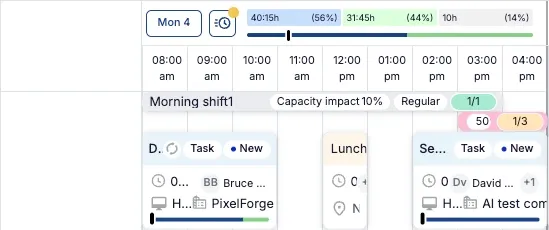
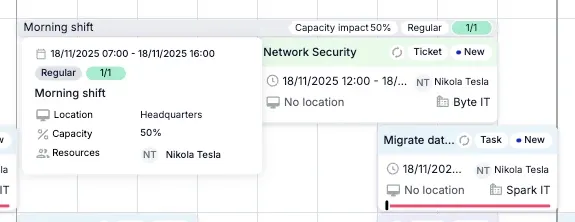
Outlook sync
When a shift is generated it appears on the engineer's Outlook calendar as an event. You control which shifts sync and what each event carries, so the calendar stays useful instead of noisy.
Generated in Proxuma

Every shift on the rota, kept current as the pattern changes.
Lands in Outlook
Outlook calendar
Each engineer sees their shifts on phone and desktop, in the calendar they already use.
Choose which shifts sync
Control what each event shows
Updates sync as the rota changes
Proof
80 +
Active MSPs
6 to 12mo
Shifts generated ahead
3
Rotation modes
0%
Standby capacity to 100
Honestly, the biggest impact could be on the scheduling team. That's where the on-call and rota work actually lives.
Pricing
One subscription covers all four modules, Planning, Project Management, Shifts and Kanban. The same plan applies across the suite; there are no per-module fees.
€60/mo
Per admin
€20/mo
Per seat
Get started