







Plan the work and see the margin, straight from your Autotask data

Proxuma is the planning, reporting and AI layer for MSPs that run on Autotask PSA. Every project timeline on one screen, engineer capacity right where you plan, and margin per client from day one.

SOC 2 Type I. Hosted in the EU or the US, your choice.

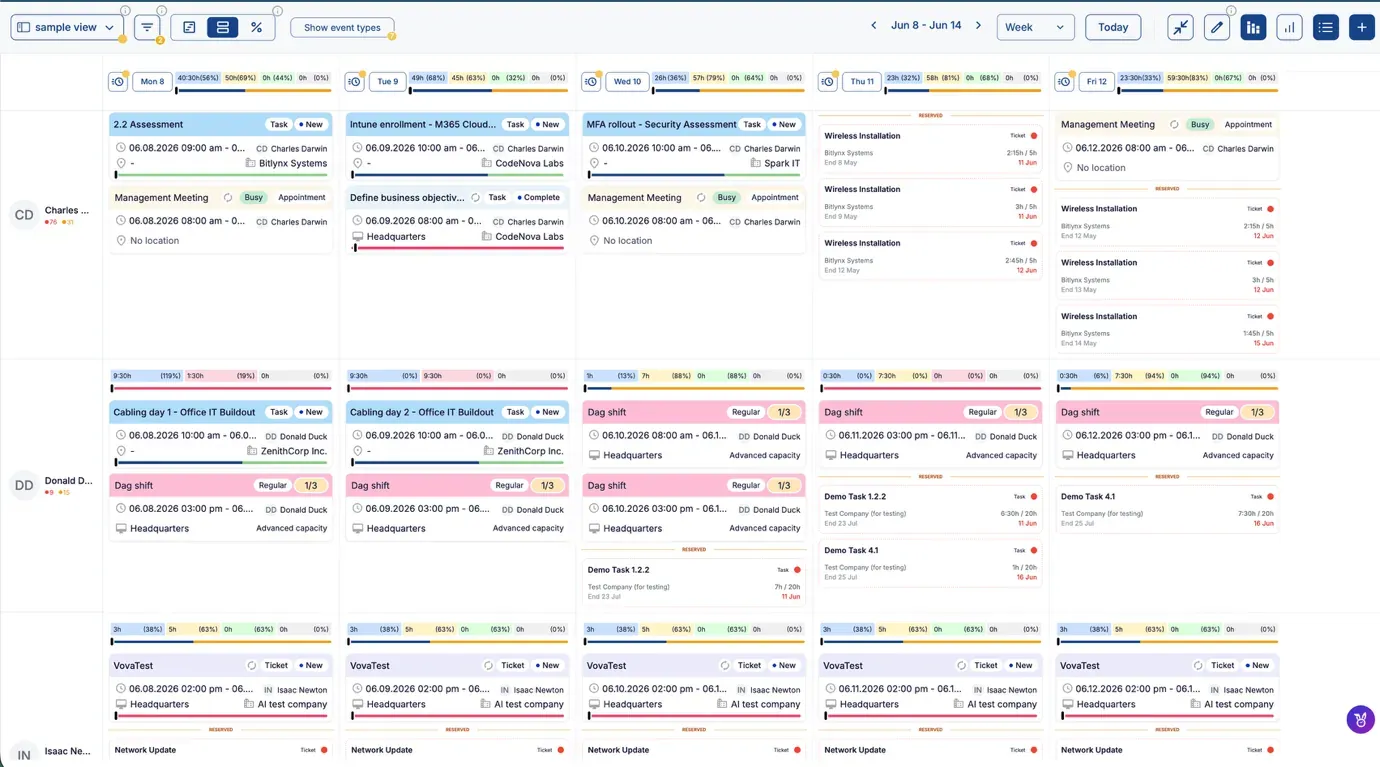
The Proxuma resource planner: a week from Monday to Friday with tickets, tasks and shifts per engineer and a capacity bar above each day.
The resource planner in Proxuma, shown on a sample environment.

One drag, and Autotask and Outlook already know

Every unplanned ticket sits in one list. Drag one onto an engineer’s calendar and Proxuma does the rest. Nothing planned here is typed into the PSA again.

Plan bucket

Wed 10:00

Firewall replacement

Noordkade office

Example data

  1. Ticket updated
  2. Service call created in Autotask
  3. Outlook invite sent from your planning mailbox, already accepted

MSPs across Europe, the UK, the US and Australia plan their week in Proxuma. Listed in the Autotask Integration Library.

  • IT Synergy
  • VanRoey
  • Conxion
  • Velzart
  • Lemontree
  • Blue Arc IT Solutions
  • FIT Technologies
  • Lancom

Plan

Tickets and projects on a visual timeline, on live Autotask data. Plan every project together and shift whole phases at once, with capacity, utilisation and conflicts in view before the week starts.

All four modules are included.

“At a glance I can see what someone’s week looks like. You just can’t do that in Autotask or Outlook.”

Bram Beukers, owner and planner, Network Company
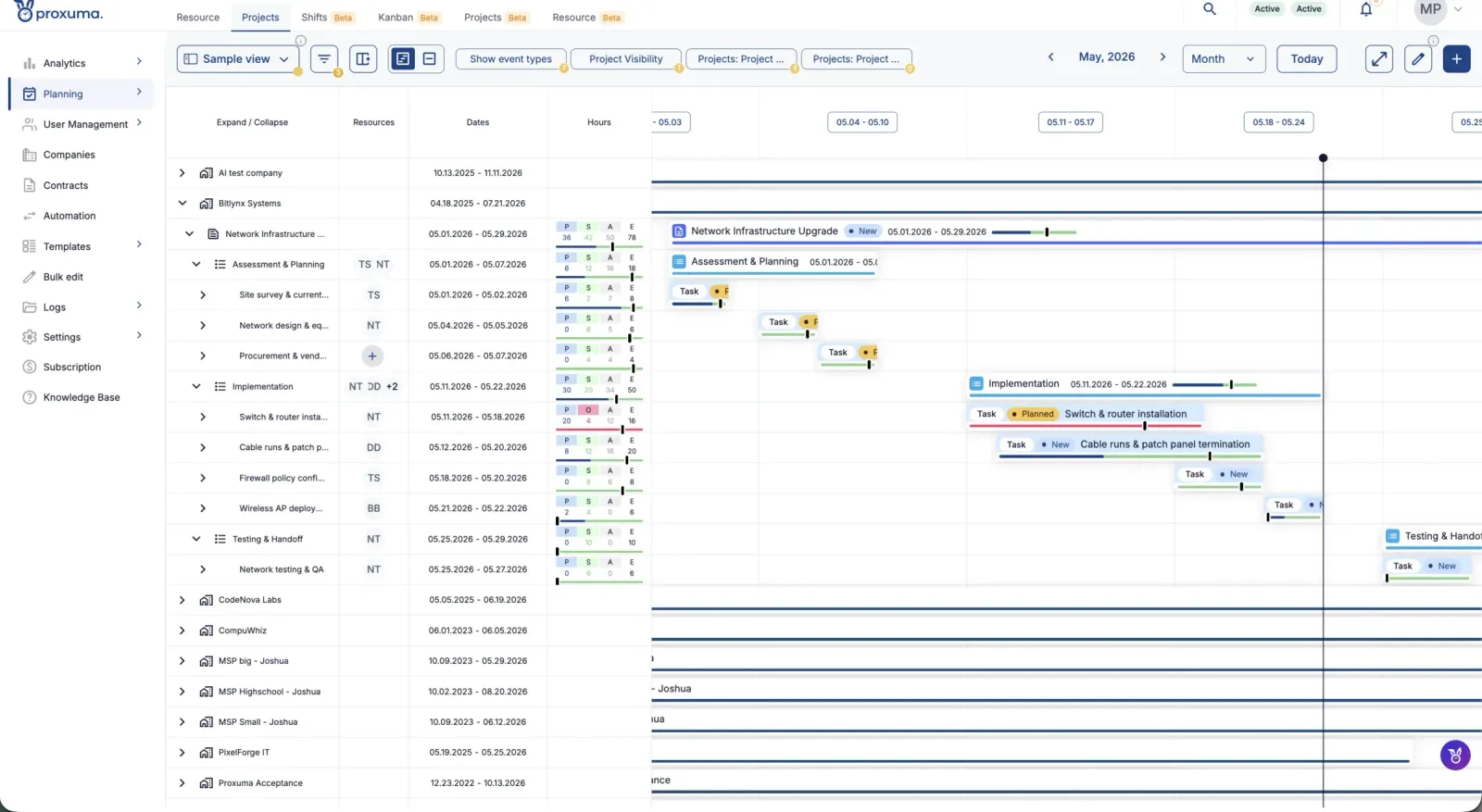
The Proxuma project Gantt: companies, projects, phases and tasks on a month timeline, with resources, dates and hours beside every row.
Plan: the project Gantt, on a sample environment.

Measure

Power BI dashboards show what the plan did to margin, capacity and SLA, per client and per team. You start from 8 role templates and 30+ prebuilt dashboards, on a model with 200+ measures across 13 data sources.

It runs in your own Power BI tenant. Your data never leaves it; Proxuma stores configuration only.

“The dashboards show me things I’d never have spotted otherwise. We were completely off track here.”

Rob Zwezereijn, owner, Running IT
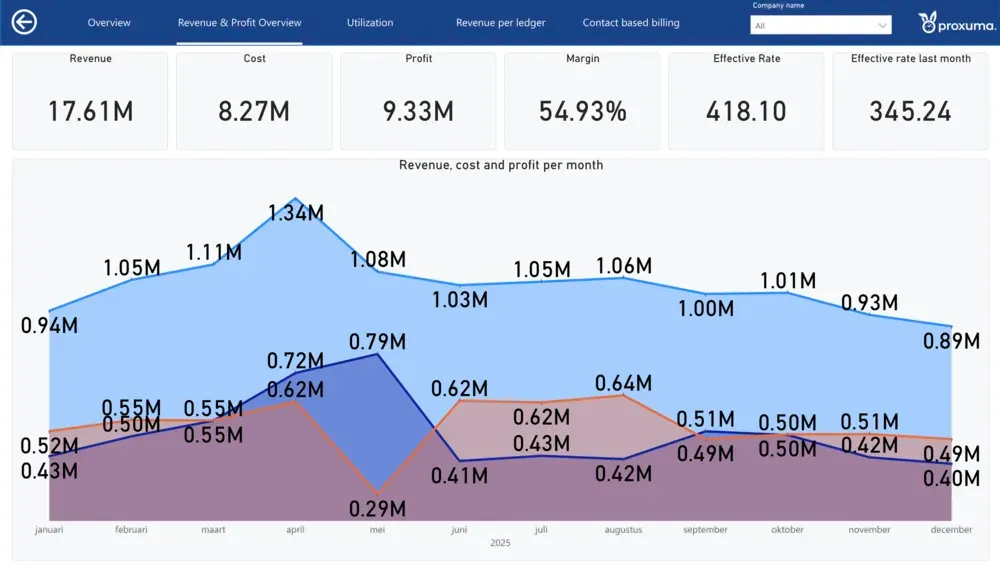
The Proxuma Power BI finance template, revenue and profit page: tiles for revenue, cost, profit and margin above a chart of revenue, cost and profit per month.
Measure: the finance template in Power BI, on sample data.

Ask

Your AI connects to that same Power BI model through the Proxuma MCP server. Ask a business question in plain English and the answer comes back in the shape you choose: a full report, a project PDF, a client-ready web page, or a single number.

It works with Microsoft Copilot, Claude and any MCP client. The AI reads the model; nothing is copied out.

Example data

Which clients ate our margin last quarter?

Three clients drove most of the drop. All three are on fixed-fee contracts signed before your last rate change.

  • Meridian IT −€9.4k
  • Summit Tech −€5.1k
  • Lakewood Systems −€3.2k
Ask: a question to the Power BI model, with example data.

What changed for two MSPs after Proxuma

Four people from Perspektiva IT on stage collecting the Community Champion award at the Kaseya Excellence Awards 2026
Perspektiva IT

Denmark, 28 people

Half a day of weekly planning became 1 hour a week

More than half of projects now land on time and under the estimated hours. Every engineer keeps at least two weeks in the calendar.

“We now deliver projects on time and under the estimated number of hours, in more than half the cases. We still have a long way to go before we are perfect, but it is getting better week by week.”


Jonas Christoffersen, Head of Operations and Projects

Read the Perspektiva IT story

Five members of the ConXioN PMO team standing in front of the glass facade of the office
Conxion

Waregem, Belgium

A five-day dispatch calendar became a month of capacity

For this year’s budget round the PMO could show how far ahead each profile is planned and how much of it is billable.

“Where it was often guesswork before, we have been able to give some insight into how billable a profile can actually be.”

Wiebe Marichael, PMO Lead. Translated from Dutch.

Read the ConXioN story

“Autotask just isn’t built for this. That’s exactly why we signed up for Proxuma.”

Stuart Potter, project lead, Iglu Tech Group, UK

“We get live support instead of being handed a product and told good luck. My expectations are blown.”

Jerry and Matt, owners, Knox Technology, USA

Onboarding help, free from day one

We don’t just hand you a login and wish you luck. Our consultants wrote and filmed everything you need to set Proxuma up yourself.

  1. Day 1

    Connect Autotask

    The timeline fills with your own tickets, projects and people the same day. Planning is live within a maximum of 24 hours.

  2. Day 5

    Set up to your liking

    We help you tune Proxuma to the way you plan and get everyone comfortable in the tool.

  3. Day 14

    Weekly free sessions

    Bring your questions to a free session every week, and start from free project templates instead of a blank board.

  4. Day 30

    Fully operational

    Projects neatly organised, the right people assigned.

Included from day one of your trial: 117 articles, 17 walkthrough videos and a shared Microsoft Teams channel where Karla and the product team pick up your questions. No onboarding costs, no implementation project.

How onboarding works

Dxfferent

Built by MSP consultants from the Netherlands

Proxuma is a product of Dxfferent, the Autotask consultancy. Every workflow in the product started as a fix inside a real MSP: dispatch that kept breaking, projects that slipped, reports nobody trusted.

The team: Autotask, Power BI and IT Glue specialists, process designers and lead auditors in the latest ISO standards. When software alone will not fix the process, the people who built Proxuma are one call away.

What does it cost, and what if it does not work out?

You licence people at the level they work at, so the whole team can be in the tool without paying planner rates for everyone.

Role Per user, per month
Engineer Executes the work: tickets, tasks, service calls and time. €20
Planner Schedules resources: buckets, capacity, shifts and bulk edits. €50
Project Manager Owns projects, companies, contracts and every template end to end. €60
Company Admin Runs the platform: users, security levels, settings and billing. Every team needs at least one. €60

Try it before you pay

14 days free with every feature and unlimited licences. A card is required at signup, but nothing is charged until the trial ends, and we remind you before it does.

Monthly, cancel any time

Move licences up or down whenever you like, billed pro rata. A year takes 10% off and three years 20%, if you want it.

No migration, no lock-in

Proxuma plans on top of your Autotask PSA data and writes every change back. Nothing to import before you start, and nothing stranded here if you stop.

Security and hosting, stated plainly

Read the SOC 2 page

SOC 2 Type I
Proxuma has completed a SOC 2 Type I audit, carried out by an independent third-party auditor. The report is available on request under a non-disclosure agreement. It is a Type I report, not a Type II report.
Hosting
Amazon Web Services, in the Region you choose: EU (Paris, France) or US (US East, N. Virginia). Data at rest, including backups, stays in that Region.
Backups
Made daily and kept for 30 days. Each customer environment has its own database.
AI
Customer data is not used to train AI models. AI features are off until your administrator switches them on.

Book a 15-minute demo on your own data

We show you your own data, not a slide deck. Or start the 14-day trial: no demo needed, up and running in less than 24 hours.
