
Source of truth

Tickets, tasks, projects, companies and time. Exactly the records your business already runs on.
Proxuma Planning
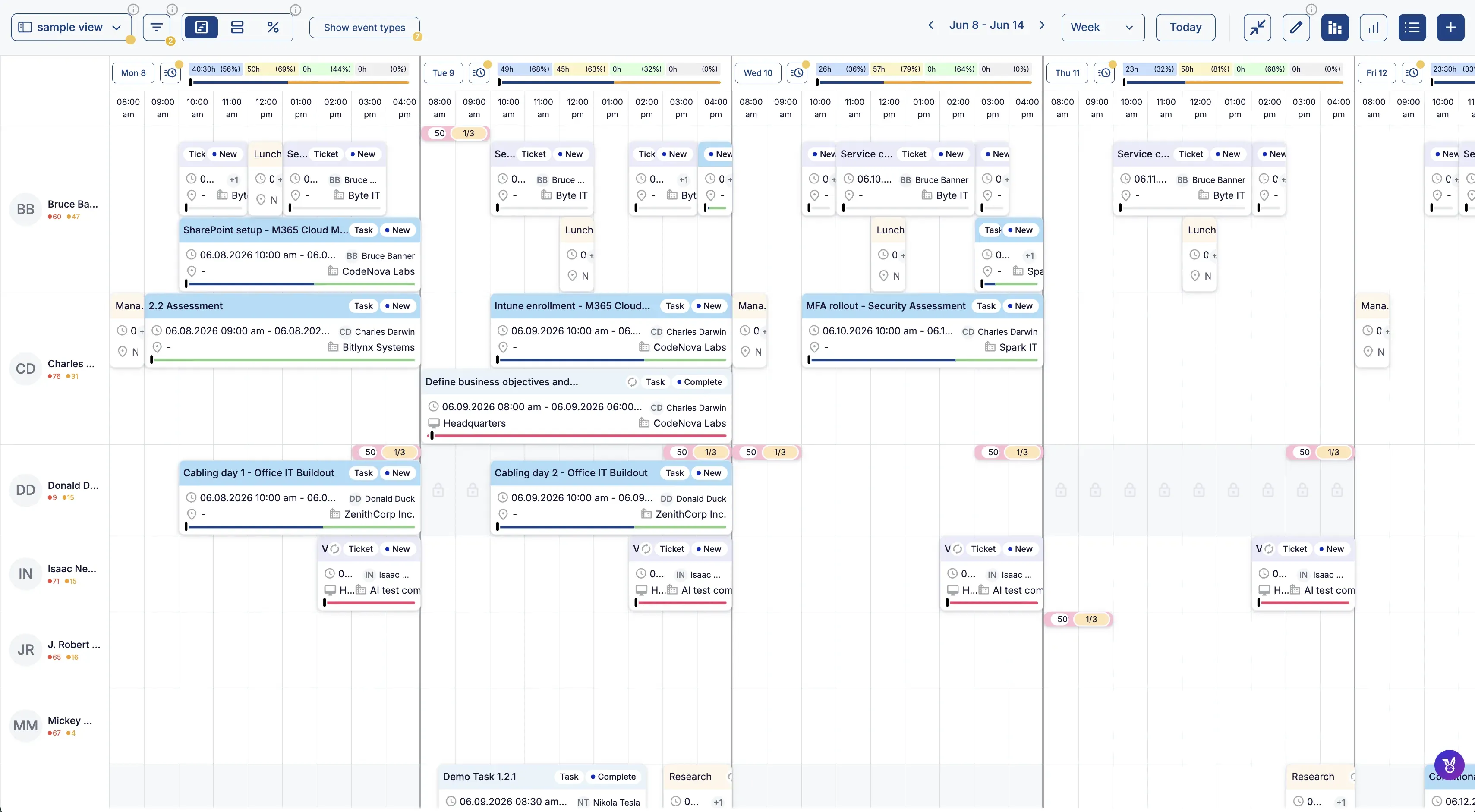
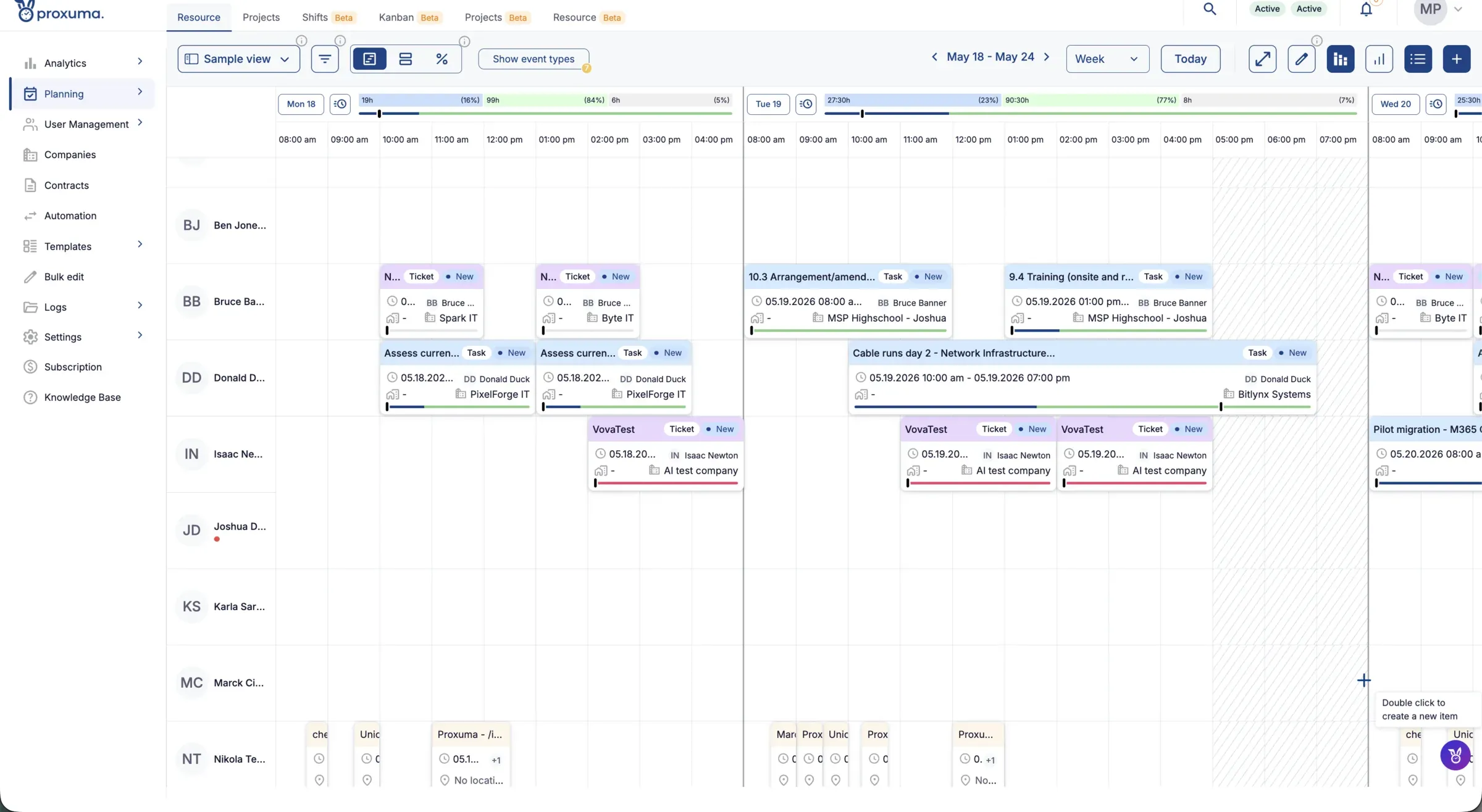
Scheduling, projects, shifts and a kanban board, all built on Autotask. Everything syncs both ways, so there is no second source of truth to keep honest.
All four modules included in Proxuma
Synced with Autotask 2 min ago · 6 over capacity on Thu
Trusted by










Customers
Proxuma has helped us get a clearer view of scheduling, shifts and resource capacity across the team. The team have been very responsive to feedback and willing to work through any issues with us. For us, the value is in making the operational picture easier to see, without turning it into micromanagement.
Resource management

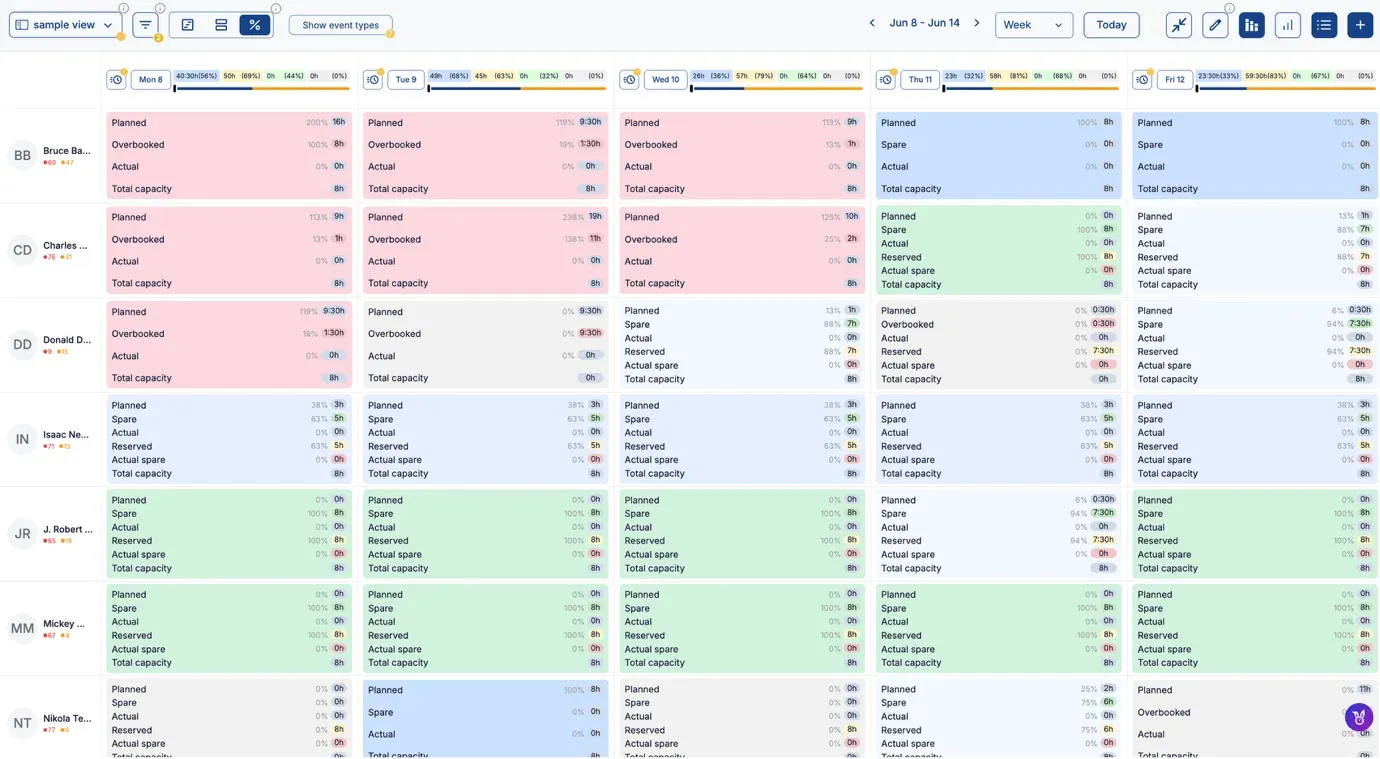
At a glance I can see what someone's week looks like. You just can't do that in Autotask or Outlook.
Planning

Planning in Proxuma is a lot more efficient than in Autotask.
Planning

When a lot of projects get approved at once and I have to plan them straight away, Proxuma helps me enormously.
Planning

Engineers can work at Projects but also work on day-to-day tasks and tickets. The combined overview of both tasks and tickets and smart filters helps our planners to plan fast and reschedule even faster. As an owner I love that I have a live overview of the workload, and the automation saved us so much time. Definitely give it a try!
Planning

Autotask just isn't built for this. That's exactly why we signed up for Proxuma.
Why Proxuma

Proxuma has helped us get a clearer view of scheduling, shifts and resource capacity across the team. The team have been very responsive to feedback and willing to work through any issues with us. For us, the value is in making the operational picture easier to see, without turning it into micromanagement.
Resource management
At a glance I can see what someone's week looks like. You just can't do that in Autotask or Outlook.
Planning
Planning in Proxuma is a lot more efficient than in Autotask.
Planning
When a lot of projects get approved at once and I have to plan them straight away, Proxuma helps me enormously.
Planning
Engineers can work at Projects but also work on day-to-day tasks and tickets. The combined overview of both tasks and tickets and smart filters helps our planners to plan fast and reschedule even faster. As an owner I love that I have a live overview of the workload, and the automation saved us so much time. Definitely give it a try!
Planning
Autotask just isn't built for this. That's exactly why we signed up for Proxuma.
Why Proxuma
This is exactly the board I wanted. I just drag tasks from to-do to in progress.
Kanban

We have used Proxuma since the very beginning, starting with version 1. Combined with Autotask PSA, it has made creating and planning projects significantly easier. The intuitive, colour-coded capacity overview gives us a clear view of our team's availability and helps us plan resources with confidence. Proxuma has become a valuable part of how we manage projects and capacity at Perspektiva IT.
Resource management

Proxuma brings our planning, projects and capacity together in one place. It's the only complete tool we have.
Planning
With a big workload it's important to be 100% in control, but it's hard to have a clear overview. Proxuma gave us back control, and through simple drag and drop features planning a task is done within seconds. We work with Autotask and love the full integration directly from the dashboard.
Planning

We get live support instead of being handed a product and told good luck. My expectations are blown.
Support

Proxuma helps us enormously to place structural blocks in the calendars of all our operational teams, so everyone has the time and room to take on their roles.
Resource management

Proxuma simply offers so much more than the competitors we looked at.
Why Proxuma

We have used Autotask for many years but never knew that we wasted so much valuable time with repetitive tasks. We love Proxuma!
Why Proxuma
The automation around keeping customers informed is a key part of how we deliver projects.
Project management

As an owner Proxuma gives me the insights I like to see. With Proxuma we eliminated the need for back-and-forth, and everyone in the team knows who's working on what. The year overview helps to identify and prevent bottlenecks before they happen.
Resource management

Proxuma gives us a single pane of glass for all our customers. No one else in the Netherlands offers that.
Planning

The dashboards show me things I'd never have spotted otherwise. We were completely off track here.
Power BI

With one click I pull a complete QBR per customer: exactly which IT infrastructure is due for an upgrade.
Power BI

I use the plan bucket intensively. It works brilliantly for me.
Planning

The out-of-the-box Autotask integration takes away the hidden cost of a consultant building integrations for us. That's perfect.
Resource management

There are very few tools that handle both planning and capacity. Proxuma does.
Planning

Proxuma allows us to use Kanban the way it's meant to be: fully customizable to our way of working and really smooth!
Kanban

It's a multi-layered Gantt chart that builds itself, as long as the information's in there. I really like that.
Project management

Proxuma has transformed how we manage projects and coordinate service calls. It centralizes planning, improves time visibility, and optimizes resources across Autotask and Outlook. The real-time integration keeps schedules accurate, and the support team is responsive and proactive. A reliable, strategic tool for our operations.
Project management

Proxuma really does everything we need. I'm genuinely enthusiastic about it.
Planning
One of our biggest challenges was understanding resource capacity and accurately planning project work in Autotask. Proxuma provided the visibility we needed to confidently allocate work, balance workloads, and improve project planning. We were pleasantly surprised by the value Proxuma's Shifts brought as well. It has become an essential tool for coordinating and managing our support team's day-to-day schedules.
Resource management

Four modules, one plan
Scheduling, projects, shifts and a board: four different planning jobs, not four lenses on the same screen. Each one writes straight back to Autotask, so the plan stays whole no matter which way you work. All four come with Proxuma: one subscription, nothing sold à la carte.
Planning - Resource scheduling
Drag a ticket or task from the Autotask backlog onto a technician and instantly see their availability, so you know whether the week can accommodate the work.
app.proxuma.com/planning
Views
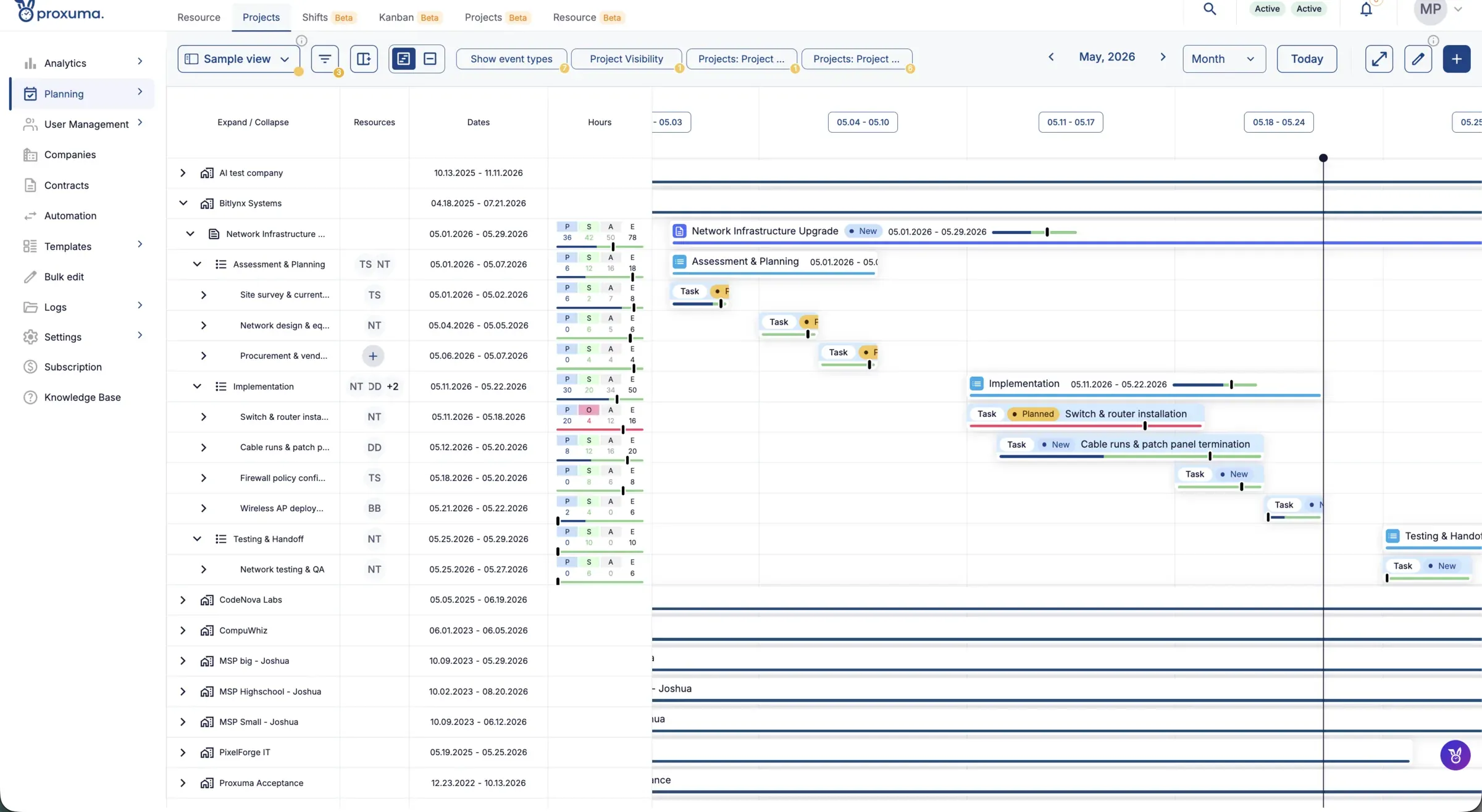
Project Management
Open a client, expand the work breakdown, and view the Gantt alongside it, with planned hours and actuals displayed on every row for direct comparison.
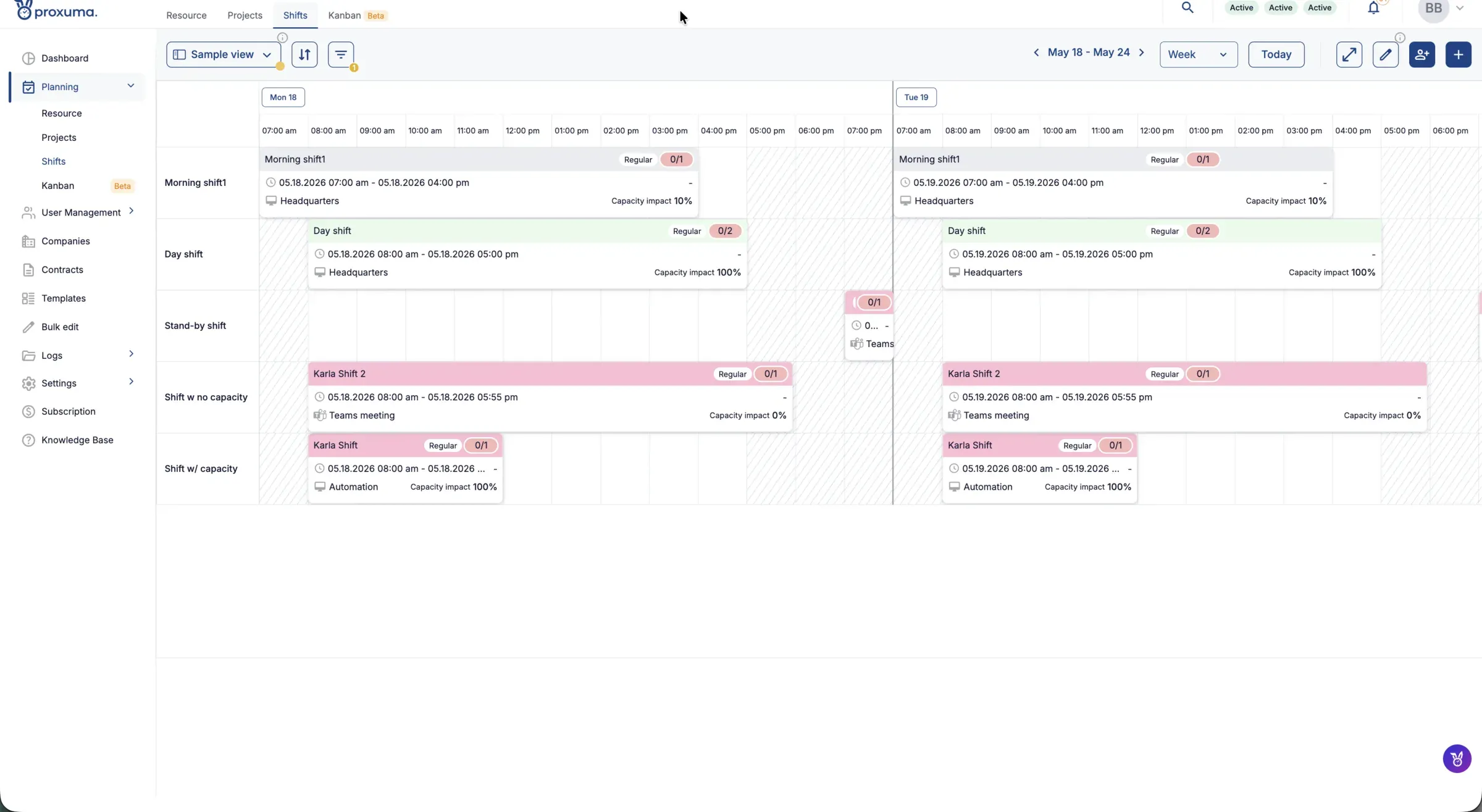
Shifts
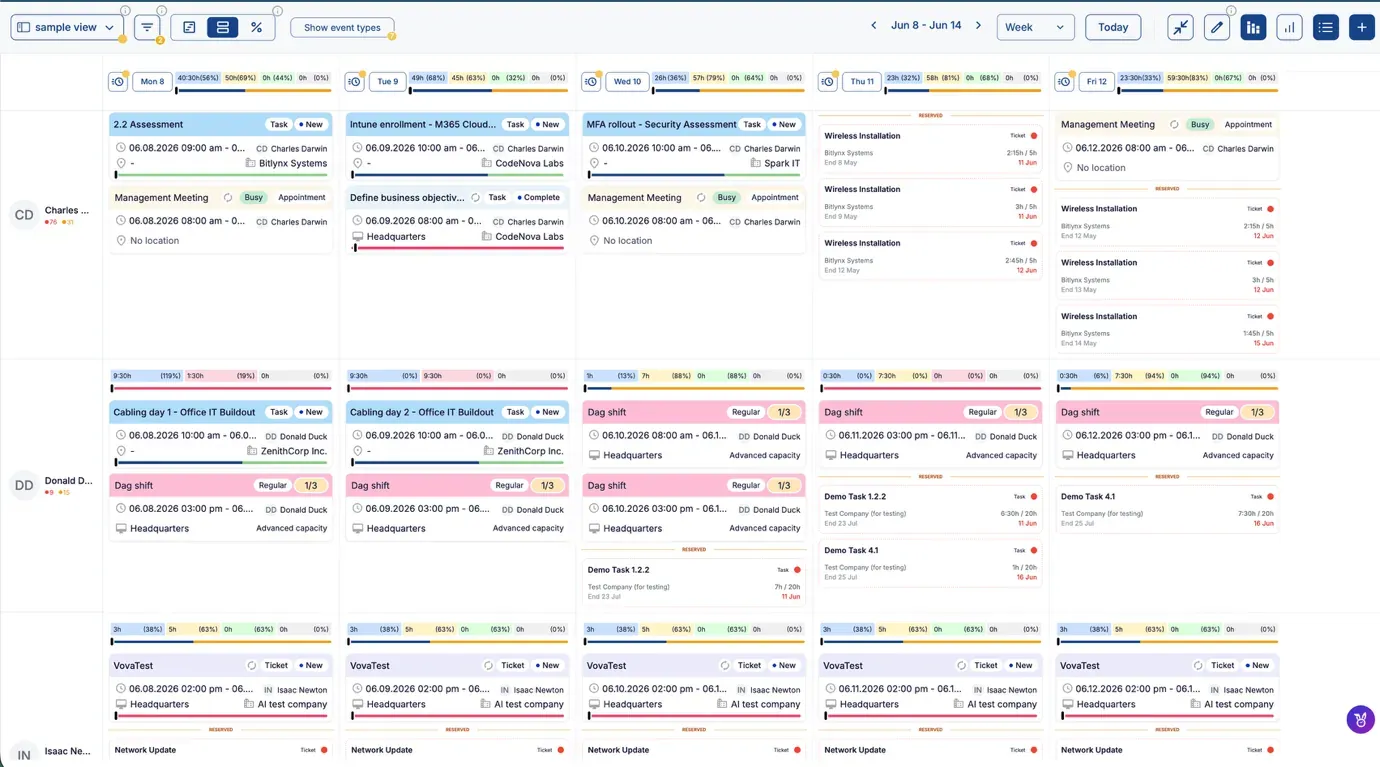
Proxuma adds a shift planner alongside your Autotask data, so coverage sits right next to the work it supports. Set your rotations once and roll them out months ahead, sharing early starts, late finishes and on-call evenly across the team. Every shift carries a capacity impact, so the planner sees how much of each engineer's day is really free.
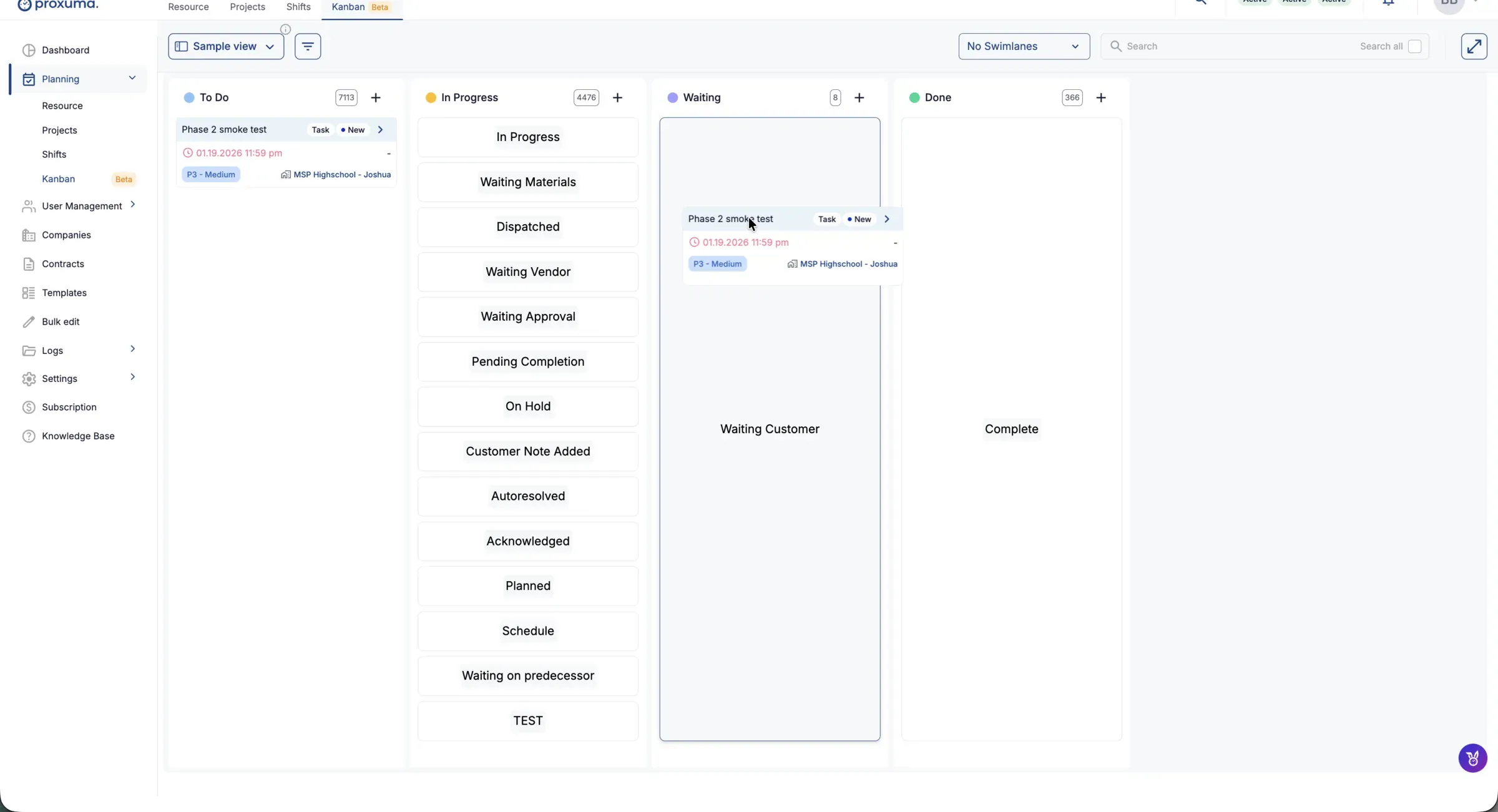
Kanban
Your Autotask statuses become the columns. Move a card and the status changes in Autotask, the same moment, no export step.
Built on Autotask
Proxuma reads and writes straight to Autotask. There is no nightly import, no copy of your data sitting somewhere going stale.
Source of truth
Two-way sync
Where you plan

Proof
80 +
Active MSPs
12 +
Data sources
<1h
Setup
EU + US
Hosting
The extra data and depth Proxuma gives us, capacity and time-entry insights, all of it, matters to us. It gives us more. It's our intelligence layer.
Pricing
One subscription covers all four modules: Planning, Project Management, Shifts and Kanban. The same plan applies across the suite; there are no per-module fees.
€60/mo
Per admin
€20/mo
Per seat
Get started