

Business development @ Proxuma
This article is reviewed by: Jasper van Horssen
Written on: Modified:
Blogs
Every month, MSPs see money evaporate. Not because of cyberattacks or downtime, but because of something even more frustrating: their own administration. Hours vanish into thin air. Invoices do not add up. Customers doubt and raise questions. And you only find out weeks later that margin has slipped away again.
One MSP director once told me: “We lose thousands of euros every month. Not because we deliver poor service or our engineers do not do their jobs, but because nobody knew whether a ticket was billable or not.” That is no exception. It is daily reality for MSPs who use Autotask as if it were just a glorified Excel sheet.
And the painful truth? The problem usually is not your people. The problem is that your system does not work for you. Under the hood of Autotask lies a mechanism that almost nobody really uses smartly: Work Types.
Many see it as a boring dropdown field. A simple label. But in reality, Work Types are the silent engine that decides whether your work is billable or not. Think of it this way: an engineer only has to log what he did. The question “is this billable?” is answered automatically by the system, not by the engineer. And that is the difference between leakage and control.
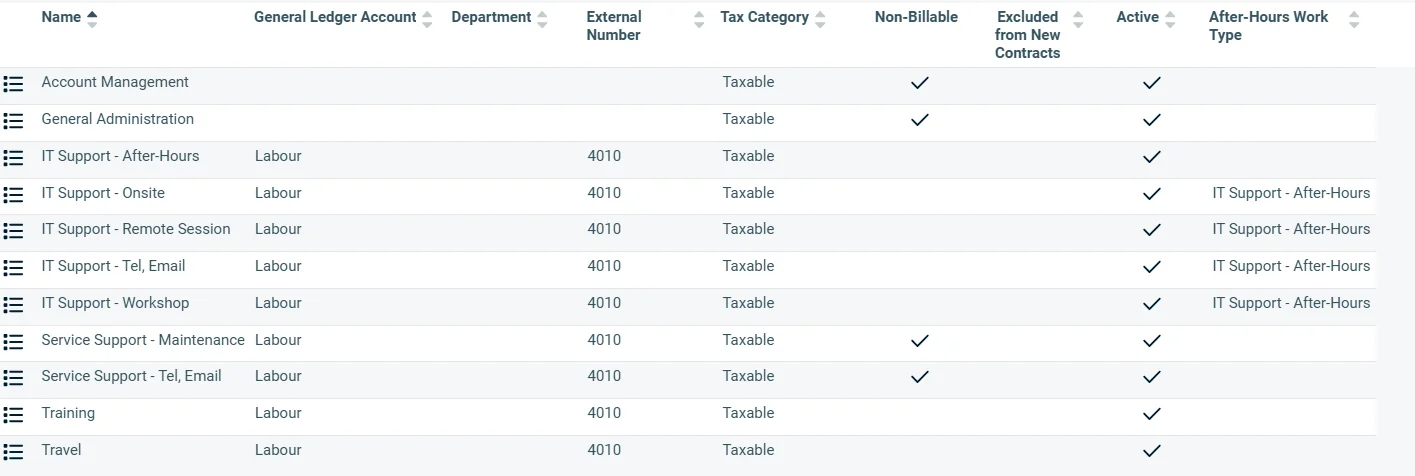
In Autotask, Work Types fall under your Billing Codes and give your system the logic to automatically decide if something is billable, taxable, and whether a multiplier applies.
Some familiar examples:
Remote support: 100% rate
After hours support: 150% multiplier
Holiday support: 200% multiplier
Non-billable: 0%
It’s important to understand: a Work Type never stands on its own. It only becomes truly valuable in combination with Contract Exclusion Sets. These define what is included in a contract (left side) and what is explicitly excluded (right side). Exclusions can be based on Work Types, Roles, or Sub-Issues. Everything on the right side is automatically treated by Autotask as not included.
In addition, you can assign an Exclusion Contract to each contract. This creates what’s called a waterfall:This creates a logical flow where Autotask runs through contracts one by one until the correct match is found. Often, this waterfall ends at a Time & Materials contract, where the work is billed to the customer on a pay-as-you-go basis.
Work Types only function effectively in combination with Sub-Issue Types and the Role linked to an employee.
Role determines the base rate (e.g. Support engineer €95/hr, Consultant €120/hr)
Work Type determines if that rate is billable, taxable, and whether a multiplier applies (e.g. 150% for After Hours)
Sub-issue Type determines whether it falls inside or outside the customer’s contract
So, an invoice line in Autotask is always the result of this triangle: Role + Work Type + Sub-issue Type. That way, an engineer never has to decide whether time should be charged. He just logs what he did. The system combines Role, Work Type, and Sub-issue Type and calculates automatically if it goes on the invoice, and at what rate.
Example: An engineer resets a password on Monday afternoon. He selects “Password reset” (Sub-issue) with Work Type “Remote support.” The system knows: this falls within contract, so billable = 0. Two days later, the same engineer patches a server on Sunday night. Same action for him: log the ticket. But this time, the system recognizes Work Type “After hours,” multiplier 200%. Invoice: €190 per hour. The engineer does not have to think about it.
That depends entirely on how your contracts are set up. If you work with one main contract per customer and Time & Materials as your standard model, then a simple set of Work Types is usually enough:
Remote Support
Onsite Support
Monitoring
Management & Maintenance
Standard Change
Non-Standard Change
SDM
Consultancy / Projects
Non-Billable
Sales
Travel Time
After Hours (150%, 200%, or both)
Compliance
In this setup, it is clear what counts as support, what is billable, and what is not. No overkill, but enough for reporting and different rates where necessary.
But once you start working with subcontracts per service, or even go further with CI-based billing, this will not be enough. You will need Work Types that mirror the structure of your service portfolio. Think of separate Work Types for Microsoft 365, Azure, Printers, or Telephony.
Work Types are powerful, but used incorrectly, they can make your billing spiral out of control. The three most common mistakes:
Too many Work Types
It sounds smart to name everything separately. But before you know it, you have a dropdown with thirty options, and engineers just click randomly. Tickets end up wrong, and your admin becomes chaos.
Too few Work Types
The opposite also happens: everything under “Remote support.” Convenient for speed, but you lose insight. You no longer know how much time really goes into management, consultancy, or changes. Billing might be roughly correct, but you miss steering information and therefore margin.
Misusing exclusions
Many MSPs only use exclusions at Work Type level. That seems neat, but under the hood, contract linking often breaks. Result: hours you thought were excluded end up on the invoice (or vice versa). Corrections later, angry customers, and your finance team losing evenings fixing it.
When you set up Work Types, Roles, and Sub-Issues tightly, something special happens: your administration shifts from burden to lever.
For engineers: no more doubt. They just log what they did. The system decides if it is in or out of contract. Result: peace, speed, less frustration.
For customers: predictable invoices. No more discussions about “why this yes and that no.” Everything matches the written agreements.
For your business: finally, grip on margin and scalability. You see where time really goes, which contracts perform, and where to adjust.
And this is where tooling like Proxuma comes in. While Work Types handle the billing logic, Proxuma ensures that same logic flows into your planning and projects. Think of capacity calculations based on service calls, insight into where engineers spend their time, and directly linking Autotask data to dashboards. The combination of tight configuration and smart tooling means you do not just fix billing, you gain forward-looking control.
Tweaking billing afterwards is like mopping the floor with the tap still running. The real win lies in a system that thinks for you.
The question is not whether you use Work Types. The question is: are you using them smartly enough? Smart enough that your engineer only clicks what he did. Smart enough that the system itself decides whether something falls inside or outside contract. Smart enough that your invoice is correct every month without red pens and arguments.
How do you get there? Start small, but start.
Make your service catalog concrete. Everything you deliver should reflect in your Work Types, Sub-Issue Types, and Roles. If your admin speaks the same language as your services, the gray areas disappear.
Clean up first, measure later. Reporting without good Work Types is like hanging a mirror in a messy room, you mostly see the mess. Set your basics right first, then add tooling like Power BI or Proxuma.
Dare to think about scalability. Not fixing things afterwards, but building a blueprint where the system makes the decisions. Then your margin grows with your revenue.
And let us be honest: setting this up properly is not something you do “on the side.” It requires choices, structure, and sometimes a fresh outside perspective. That is exactly where we help MSPs: from designing your blueprint to configuring Autotask and implementing Proxuma, so your billing and your planning finally align.
Business development @ Proxuma
This article is reviewed by: Jasper van Horssen
Written on: Modified: